Cuibit publishes insights from shipped delivery work across web, WordPress, AI and mobile. Articles are written for real buying and implementation decisions, then updated as the stack or the advice changes.
Cuibit AI Systems
Applied AI and LLM delivery team
The Cuibit team focused on production RAG, LLM integration, workflow automation, evaluation and model cost control.
Key takeaways
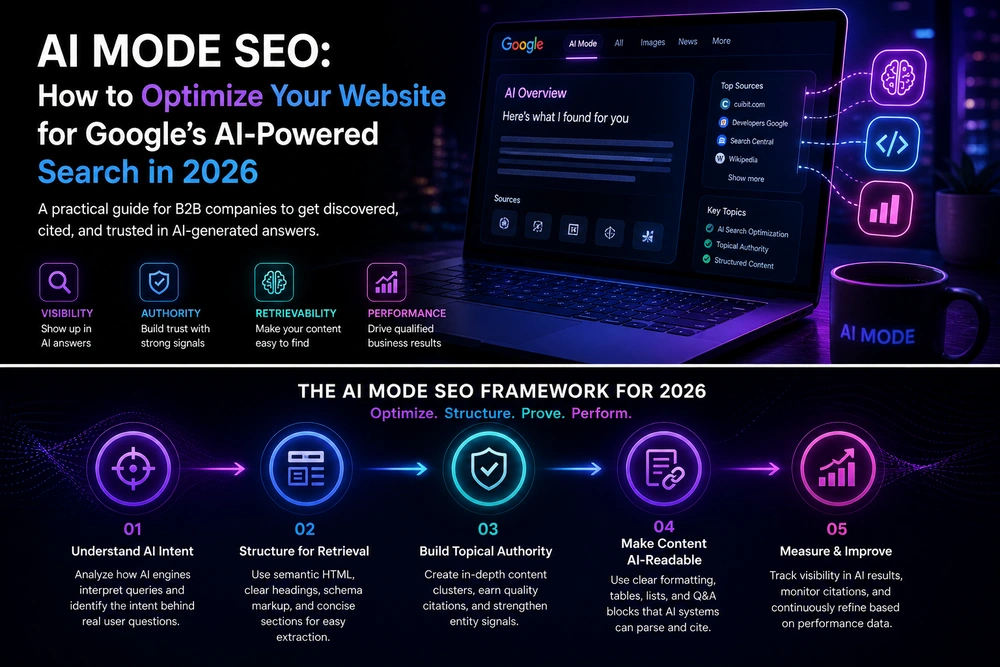
- AI-assisted search is no longer just a content issue. It affects website architecture, page design, evidence quality, analytics, conversion paths, and how buyers compare vendors before they ever submit a form.
- Google has made clear that AI Overviews and AI Mode still rely on the fundamentals: crawlable pages, indexable text, strong internal links, useful content, page experience, high-quality media, and structured data that matches visible content.
- The biggest mistake is treating AI Mode as a new keyword channel. The better move is to prepare each important page to answer a buyer's full comparison workflow: problem, options, proof, tradeoffs, process, pricing logic, risks, and next steps.
- B2B websites should build page clusters around buyer jobs, not just services. A service page should connect to evidence pages, comparison pages, implementation guides, case studies, FAQs, and technical explainers.
- Websites built with weak JavaScript rendering, thin service pages, hidden copy, slow layouts, vague claims, or disconnected blog posts will struggle in AI-assisted sessions because they give both people and search systems less to work with.
- The practical plan is simple but demanding: audit crawlability, rebuild important pages around decision intent, add proof, clarify entities, improve performance, connect pages with thoughtful internal links, and track assisted search behavior with Search Console and analytics.
Why this topic matters now
Google's AI Mode and AI Overviews are changing the shape of search behavior. A buyer can now ask a longer question, compare vendors, open a page beside an AI-assisted answer, ask follow-up questions, and continue evaluating without the old pattern of ten separate searches and ten disconnected browser tabs.
That does not mean websites are less important. It means websites need to carry more of the decision. A B2B service page that once targeted a keyword such as "AI development company" now has to support a larger set of questions: What exactly do you build? What proof do you have? What architecture choices do you recommend? What risks should a buyer avoid? How does your process differ from a freelancer, a staffing agency, or a large consultancy? What would a realistic budget include? What should a buyer inspect before booking a call?
This is why AI Mode website optimization is a serious business topic, not a label for another SEO trend. The buyer journey is becoming more conversational, multimodal, and comparison-heavy. The website has to be ready for that behavior.
For Cuibit, the practical connection is clear. Companies investing in AI development services, SaaS platforms, WordPress rebuilds, or technical SEO need websites that are readable by people, accessible to search systems, and structured enough to support AI-assisted discovery.
What changed with AI-assisted search
Classic search often worked like this: a user typed a short query, scanned blue links, opened a few pages, and refined the query if the first results were not useful. AI-assisted search changes that flow. The first query can be longer. The system can break the task into subtopics. It can show supporting links inside an answer. It can let the user ask follow-up questions while keeping context.
For B2B websites, three changes matter most.
First, the query is broader. Buyers are no longer limited to "best web development agency." They can ask, "Which type of web development partner should a funded SaaS company choose if it needs a Next.js marketing site, a customer dashboard, and a phased migration from a legacy backend?" That query contains strategy, architecture, budget, migration risk, and vendor fit in one request.
Second, the comparison happens earlier. A buyer may compare your page against a competitor page, a review article, a forum discussion, and a case study before contacting anyone. Thin claims lose power quickly because the buyer can ask follow-up questions about them.
Third, the website experience becomes part of the answer. If a user opens your page beside an AI-assisted session, the page has to help them continue the evaluation. That means the visible content, layout, examples, proof points, internal links, and calls to action need to be aligned.
This is not only about ranking. It is about being useful during an active decision.
AI Mode website optimization is not a separate magic checklist
One tempting mistake is to search for a special AI Mode schema, a hidden text file, or a machine-only optimization layer. Google has said the fundamentals still apply. Pages need to be eligible for Search, crawlable, indexable, useful, and supported by visible text. Structured data should match what users can see. Important content should not be buried in inaccessible scripts, images, tabs, or PDF-only assets.
The better question is not "How do we optimize for AI Mode?" The better question is: "If a serious buyer asks a multi-step question, does our website provide enough clear, trustworthy, connected information to deserve being included and clicked?"
That reframing changes the work. Instead of publishing more generic articles, you improve the quality of your service pages and supporting content. Instead of adding schema to weak pages, you make the visible page more specific. Instead of chasing every phrase, you build a content architecture around real buying tasks.
A useful related starting point is Cuibit's guide on how to audit a website for AI search visibility. The audit mindset matters because AI-assisted search rewards clarity across the whole site, not isolated keyword tricks.
The new B2B buyer journey: from keyword intent to task intent
Traditional SEO planning often groups pages by keyword intent: informational, commercial, transactional, navigational. That structure still helps, but it is no longer enough for complex B2B services.
AI-assisted search pushes buyers toward task intent. A task intent is the full job the buyer is trying to complete. For example:
- "I need to decide whether to build a RAG chatbot or a normal support chatbot."
- "I need to compare Flutter and React Native for a field operations app."
- "I need to know whether our WordPress site needs speed optimization or a full rebuild."
- "I need to shortlist a partner for an LLM integration without overbuilding the first version."
- "I need to understand what a SaaS dashboard rebuild should include before asking for proposals."
Each of these tasks contains education, comparison, risk assessment, scope definition, proof, and vendor selection. A single service page cannot answer everything, but it can connect the buyer to the right next pages.
That is where internal linking becomes strategic. A page about RAG development should connect naturally to content explaining retrieval quality, document pipelines, evaluation, permissions, and maintenance. A page about LLM integration services should clarify where LLMs fit inside existing products, support workflows, CRMs, internal tools, and customer-facing experiences.
The goal is not to push every visitor to a contact form immediately. The goal is to help them become a better buyer. That builds trust before the sales conversation starts.
What an AI-assisted website audit should inspect
A useful AI Mode website optimization audit should cover five layers: technical access, content usefulness, entity clarity, proof, and conversion continuity.
1. Technical access
Start with the basics. Can search systems crawl the important pages? Are pages indexable? Does the mobile version include the same important links and content as desktop? Are service pages rendered reliably without depending on fragile client-side behavior? Are page titles, headings, canonical tags, image alt text, and internal links clean?
This is especially important for modern JavaScript-heavy sites. React, Next.js, and headless builds can perform well, but only when rendering, routing, metadata, and content delivery are handled carefully. If your company is rebuilding a marketing site or SaaS front end, a technically sound Next.js development approach can improve both user experience and search accessibility.
For WordPress sites, the same principle applies. A slow page builder setup, plugin bloat, poor image handling, and layout instability can weaken the experience during a buyer evaluation. If the site already has strong content but weak performance, WordPress speed optimization may be a better first move than another content sprint.
2. Content usefulness
A useful page answers the question behind the query. It gives the buyer enough context to make a decision, not just enough copy to fill a template.
For a service page, that usually means explaining:
- who the service is for
- which problems it solves
- what is included and excluded
- how the process works
- what technical choices matter
- what risks buyers should avoid
- how pricing is usually shaped
- what proof supports the claim
- what a sensible next step looks like
A page about AI chatbot development, for example, should not only say that chatbots improve support. It should explain knowledge sources, retrieval, escalation paths, analytics, model selection, privacy, handoff to humans, hallucination controls, testing, and maintenance. That is the difference between a brochure and a page that can support an AI-assisted comparison.
3. Entity clarity
AI-assisted search depends heavily on understanding entities and relationships. A brand should make it easy to understand who it is, what it does, which markets it serves, what services it offers, which technologies it works with, and how its proof connects to its claims.
This does not require awkward repetition. It requires clean architecture. Your about page, service pages, author profiles, case studies, portfolio pages, and articles should agree with one another. Naming should be consistent. Service categories should be clear. Portfolio examples should support the relevant services.
Cuibit has already covered this in more depth in entity SEO for AI search. For B2B companies, entity clarity is often where content strategy and web architecture meet.
4. Proof quality
AI-assisted buyers can compare claims quickly. Generic proof is weaker than specific proof.
Weak proof sounds like this: "We build scalable, high-quality apps for global clients."
Useful proof sounds like this: "We rebuilt a B2B WooCommerce catalog with role-based pricing, faster product filtering, cleaner checkout logic, and measurable Core Web Vitals improvements."
A strong page should include concrete examples, screenshots, architecture notes, measurable outcomes where possible, client types, constraints, and lessons learned. The proof does not always need to reveal confidential data. It does need to be specific enough to be credible.
Portfolio pages and case studies matter here. A visitor evaluating Cuibit's engineering capability may find a relevant example in the portfolio before deciding whether to request a technical conversation.
5. Conversion continuity
AI-assisted search may bring users to pages at different stages. Some will arrive ready to compare vendors. Others will still be learning. The page should support both.
A good conversion path does three things. It offers a low-friction next step, gives the buyer enough confidence to act, and avoids forcing one CTA on every intent. For a complex service, that might mean a contact CTA, a related guide, a portfolio example, and a checklist section on the same page.
This is where many B2B sites fail. They publish useful educational content but do not connect it to a service. Or they build a service page with strong CTAs but no evidence. AI-assisted journeys expose those gaps because buyers move between learning and evaluating faster.
A practical implementation plan for B2B teams
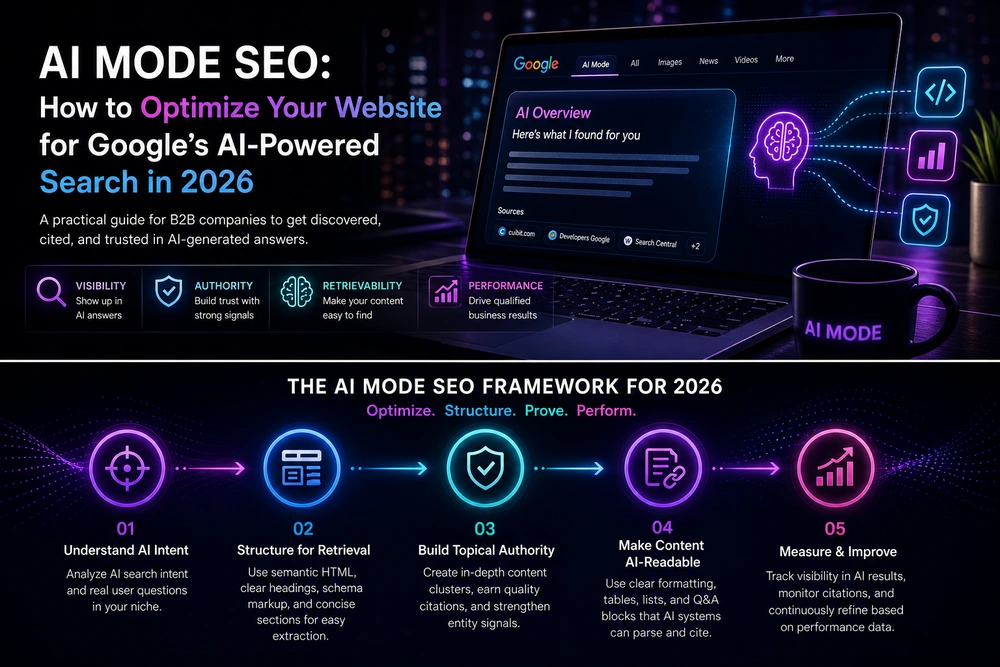
The best implementation plan is not "publish fifty AI search articles." It is a focused rebuild of the pages that influence revenue.
Step 1: Choose the money pages
Start with 5 to 12 pages that matter most to pipeline. These are usually core service pages, location pages, pricing or comparison pages, high-intent guides, and proof pages. Do not start with the entire blog archive.
For each page, write down the real buyer question it should answer. A page called "AI Automation" might need to answer: "Can this partner help us automate a business process without creating a fragile workflow that breaks every time the inputs change?" A page called "React Development" might need to answer: "Can this team build a maintainable product interface, not just a pretty front end?"
Step 2: Map task intent around each page
For every money page, map the buyer's task before and after reading it. The map should include:
- initial problem
- common alternatives
- risks
- decision criteria
- required proof
- technical questions
- cost drivers
- operational impact
- next step
This map becomes the outline for the page and the surrounding content cluster. It also prevents generic writing because it forces the team to answer real questions.
Step 3: Rewrite for decision support
A strong service page should read like a consultant explaining the decision, not a sales deck. It should be specific about fit.
For example, instead of saying "We build AI automations for any business," explain which workflows are worth automating first, which workflows should remain human-reviewed, which systems need integration, and how the company should measure success. That kind of page helps buyers even if they do not contact you, which is the standard good content should meet.
Step 4: Add evidence blocks
Every important page should include evidence. Evidence can include:
- relevant portfolio links
- architecture diagrams
- before-and-after performance notes
- process screenshots
- anonymized project constraints
- short technical explanations
- known tradeoffs
- testing methods
- maintenance expectations
For a SaaS engineering page, this might include reliability concerns, authentication flows, admin dashboards, observability, API design, and migration planning. For a WordPress page, it might include plugin reduction, image strategy, caching, database cleanup, hosting constraints, and editorial workflows.
Step 5: Improve internal links
Internal links should help users continue a decision. They should not exist only to pass authority.
A good internal link answers a natural next question. If an article explains AI-generated answers, link to how to appear in AI-generated answers without publishing generic AI content. If a service page talks about complex knowledge retrieval, link to RAG development. If a portfolio page shows a WordPress Core Web Vitals turnaround, link from relevant WordPress performance content.
The anchor should describe the destination plainly. Avoid vague anchors such as "click here" or forced keyword anchors repeated across the site.
Step 6: Fix performance and page experience
AI-assisted discovery still sends humans to pages. If the page is slow, unstable, hard to read, or confusing on mobile, the traffic has less value.
For most B2B teams, performance work should focus on:
- image compression and correct dimensions
- font loading
- script reduction
- caching
- server response time
- layout stability
- mobile navigation
- accessibility
- clean forms
- readable spacing
- fewer popups and interruptions
Speed is not only an SEO metric. It is a trust signal during evaluation.
Step 7: Measure what can be measured
Search Console includes AI feature traffic in web search reporting rather than giving every AI surface a neatly separated report. That means teams should avoid pretending they can measure everything perfectly.
A practical measurement setup should combine:
- Search Console query and page trends
- landing page engagement in analytics
- assisted conversions
- form quality
- scroll behavior
- CTA clicks
- internal search data if available
- CRM source notes
- sales call language
The most useful insight often comes from patterns, not one metric. If a rewritten service page earns better impressions, lower bounce behavior, more qualified form submissions, and sales calls with better-informed buyers, the work is probably moving in the right direction.
Common mistakes to avoid
Mistake 1: Publishing generic AI content at scale
AI tools can help with research, outlines, editing, and structure. They should not be used to flood a site with shallow pages. Google's guidance is clear that scaled content without real value can violate spam policies.
For B2B companies, the risk is not only ranking loss. The bigger risk is brand damage. A buyer can spot generic content quickly. If every article repeats basic definitions and never explains tradeoffs, the brand looks less expert.
Mistake 2: Treating schema as a substitute for substance
Structured data helps search systems understand eligible content, but it should match visible content. It cannot turn a weak page into a useful one. Add schema after the page is accurate, specific, and complete.
Mistake 3: Hiding important content behind design patterns
Tabs, accordions, interactive cards, sliders, and JavaScript-rendered sections can be useful when implemented well. They become a problem when they hide the only meaningful content, break on mobile, or render inconsistently. Important explanations should be available in clear text.
Mistake 4: Building blog content with no path to revenue
A blog can attract early-stage buyers, but it needs a connection to services and proof. If a guide ranks but never helps the reader understand the company's capability, it is unfinished. Useful internal links, relevant CTAs, and portfolio references are part of the content experience.
Mistake 5: Over-optimizing for one search surface
AI Mode, AI Overviews, classic search, social discovery, referrals, and direct visits all matter. A page that helps a serious buyer will usually perform better across multiple surfaces. Do not narrow the work to one feature or one report.
What different types of websites should prioritize
SaaS companies
SaaS companies should focus on product clarity, use-case pages, integration pages, comparison pages, security and compliance explanations, documentation quality, and performance. Buyers often compare features and implementation risk before booking a demo. Pages should explain who the product is for, how it fits into a workflow, and why it is better than building the capability internally.
Service businesses
Service businesses should improve service pages, proof pages, author expertise, process explanations, pricing logic, and location relevance where appropriate. The goal is to make the buyer confident that the team understands the project type and can handle practical constraints.
Ecommerce businesses
Ecommerce sites should prioritize product data quality, product variant clarity, shipping and return details, review structure, category descriptions, comparison support, technical performance, and media quality. AI-assisted shopping experiences can expose weak product information quickly.
WordPress businesses
WordPress-heavy sites should inspect performance, plugin risk, content structure, editorial workflows, schema hygiene, security, and maintainability. Many WordPress SEO problems are not content problems first. They are performance, theme, plugin, and information architecture problems.
AI product companies
AI companies need unusual clarity because buyers are skeptical. Explain model choices, data flow, privacy, evaluation, failure modes, human review, cost drivers, and maintenance. For complex systems, a technical architecture guide can be more persuasive than a broad marketing page.
A useful page template for AI-assisted discovery
A high-intent B2B service page should usually include these sections:
- A clear description of the service and who it is for.
- The specific business problems the service solves.
- A short explanation of when the service is not the right fit.
- The process from discovery to launch.
- Technical architecture or delivery details.
- Tradeoffs and decisions the buyer should understand.
- Pricing or budget logic, even if exact pricing requires scoping.
- Proof through portfolio examples, results, or technical notes.
- FAQs based on sales conversations, not keyword tools alone.
- Internal links to related guides, services, and proof pages.
- A clear next step that respects the buyer's stage.
This template works because it mirrors how buyers think. It also gives search systems more useful context without stuffing the page.
When to rebuild versus optimize
Not every site needs a rebuild. Some need better content architecture. Others need technical cleanup. Others need a new platform.
Optimize when:
- the CMS is maintainable
- pages are indexable
- performance issues are fixable
- the design supports long-form decision content
- the current architecture can support better internal links
- the brand and service positioning are still accurate
Rebuild when:
- the front end blocks or weakens indexing
- the CMS slows down publishing
- service pages are trapped in rigid templates
- performance problems come from the foundation
- navigation no longer matches the business
- the site cannot support proof, comparison, and decision content
- analytics and conversion tracking are unreliable
A rebuild should not be cosmetic. It should improve findability, speed, content operations, credibility, and conversion. If your team is considering that level of work, it is worth reviewing Cuibit's case studies and then starting with a focused technical and content audit before writing a new page list.
Editorial conclusion
AI Mode website optimization is not about chasing a new badge on the search results page. It is about preparing your website for the way buyers now research: longer questions, faster comparisons, more follow-ups, more context, and less patience for vague claims.
The companies that benefit will not be the ones that publish the most AI-written pages. They will be the ones that make their expertise easier to understand, verify, compare, and act on. That means better service pages, stronger proof, clearer technical explanations, faster experiences, and internal links that help buyers continue the decision.
For B2B teams, the practical question is simple: if an AI-assisted buyer opened your most important page beside a competitor's page today, would your page help them make a smarter decision?
If the honest answer is no, the next step is not more content volume. It is a serious audit of the pages that matter most, followed by focused improvements that make the website more useful to both people and search systems.
Need this advice turned into a real delivery plan?
We can review your current stack, pressure-test the tradeoffs in this guide and turn it into a scoped implementation plan for your team.