Cuibit publishes insights from shipped delivery work across web, WordPress, AI and mobile. Articles are written for real buying and implementation decisions, then updated as the stack or the advice changes.
Cuibit WordPress Performance
WordPress and WooCommerce delivery team
The Cuibit team focused on custom WordPress builds, WooCommerce systems, Core Web Vitals and long-term maintainability.
Key takeaways
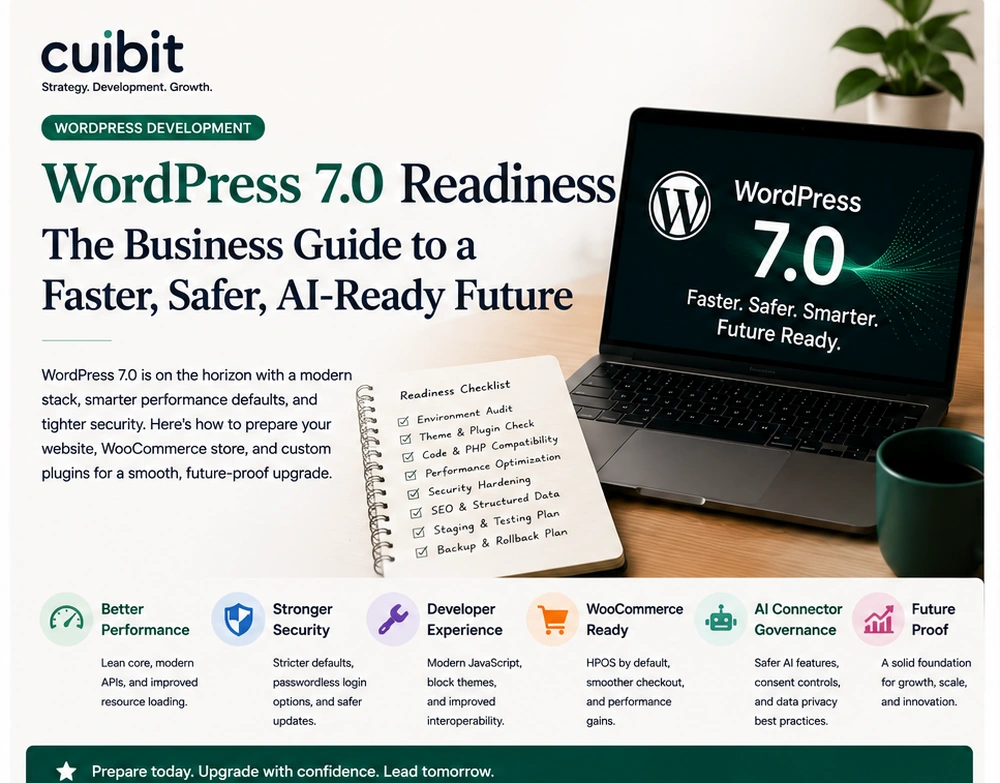
- WordPress 7.0 is close enough that business websites should move from awareness to planning. The update is expected to affect editorial workflows, developer tooling, block-based builds, plugin compatibility, and how teams test major platform changes.
- WooCommerce stores need a stricter process than normal brochure sites. Checkout, payments, taxes, coupons, shipping, customer accounts, order emails, analytics, product templates, and extensions should be tested in staging before production is upgraded.
- Real-time collaboration and editor workflow improvements can help content teams, but they also create new questions about permissions, revisions, approvals, staging, and who can safely edit published pages.
- Custom themes, page builders, custom blocks, theme.json, plugin overrides, and WooCommerce template changes should be audited before release week. The risk is rarely WordPress core alone; it is how core interacts with the site stack.
- Performance should be treated as part of the upgrade. A major release window is the right time to remove plugin bloat, fix image handling, review caching, check database health, and improve Core Web Vitals.
- The safest plan is phased: inventory, staging copy, compatibility testing, performance baseline, checkout and form testing, SEO review, backup, rollback plan, launch window, and post-launch monitoring.
Why this topic matters now
WordPress 7.0 is one of the most important WordPress milestones for business websites in 2026. The latest WordPress release activity and developer updates point toward a platform that is becoming more collaborative, more block-focused, and more connected to modern developer workflows. That is good news for teams that use WordPress as a serious business platform, but it also means site owners should not treat the upgrade as a routine button click.
For a small informational website with a clean theme and a short plugin list, the update may be straightforward. For a WooCommerce store, service business website, membership platform, multilingual site, headless WordPress build, or custom plugin-heavy setup, the upgrade deserves planning. A major WordPress update can expose old plugin debt, fragile theme overrides, outdated PHP assumptions, slow database queries, or editorial workflows that were never properly documented.
This is why WordPress 7.0 readiness should be approached as a business continuity project. The question is not only, "Will the site update?" The better question is, "Can the business update without breaking the journeys that produce leads, sales, content, support, and trust?"
For Cuibit, the topic connects directly to WordPress development services, WooCommerce engineering, speed optimization, maintenance, and technical SEO. A serious WordPress website is not only a content system. It is a live business asset with forms, analytics, editorial teams, customer journeys, integrations, and revenue impact.
What is changing with WordPress 7.0
The most important shift is that WordPress is continuing to move toward a more modern, collaborative editing model. Real-time collaboration is the headline that many site owners will notice first. For editorial teams, agencies, and businesses with multiple stakeholders, that can reduce content handoff friction. Writers, editors, designers, and clients can work closer to the same content experience.
But collaboration changes the control model. If multiple people can work closer to the same content at the same time, the business needs clear rules for drafts, approvals, revisions, publishing rights, template editing, and emergency rollback. A marketing team may want faster updates. A legal, healthcare, finance, or B2B company may need tighter approvals.
The second shift is the continuing growth of Gutenberg, block themes, theme.json, patterns, and modern site editing. Sites that are already built cleanly with blocks and reusable components may benefit. Sites built on years of shortcodes, patched templates, old page builder sections, or custom editor hacks may need developer review.
The third shift is developer tooling. WordPress Playground, MCP-related tooling, plugin development updates, and API work make it easier for developers to test and prototype. This matters because good upgrade planning depends on repeatable testing. A business should be able to reproduce the site, test the update, inspect errors, and roll back if needed.
Why WooCommerce stores need a stricter checklist
WooCommerce sites are more sensitive than standard WordPress websites because they process transactions. A visual layout issue on a blog post is inconvenient. A broken checkout is revenue loss. A coupon bug can change margins. A shipping issue can create customer service problems. A payment gateway conflict can stop orders.
That is why a WooCommerce upgrade should always include a store-specific test plan. At minimum, test product pages, category pages, product search, filters, cart, checkout, payment gateways, shipping methods, taxes, coupons, customer account pages, order emails, refunds, subscriptions, inventory updates, and analytics events.
Stores with custom pricing, wholesale roles, multilingual content, subscriptions, memberships, product bundles, ERP integration, CRM sync, or custom checkout fields need deeper testing. A compatibility issue may appear only in a specific product type, customer role, country, shipping zone, or payment method.
Cuibit treats this kind of work as ecommerce engineering, not just CMS updating. A strong WooCommerce development plan should include catalog structure, checkout reliability, performance, Store API behavior, extension compatibility, and order operations.
The important point is simple: if the store makes money, test like money is at risk.
The WordPress 7.0 readiness audit
A practical readiness audit should cover eight layers: environment, theme, plugins, custom code, WooCommerce, performance, SEO, and team workflow.
1. Hosting and environment
Start with the foundation. Confirm PHP version, database version, hosting resources, object cache, CDN configuration, backups, staging, error logs, cron jobs, and deployment process. Many WordPress upgrade problems are blamed on plugins when the deeper issue is an outdated server or weak staging setup.
A reliable staging environment should closely match production. It should not be a half-broken copy with missing plugins, different PHP settings, or outdated data. If staging does not match production, test results are less trustworthy.
2. Theme and templates
Review whether the site uses a classic theme, block theme, child theme, custom theme, commercial theme, or page builder. Check template overrides, theme.json, global styles, custom CSS, reusable patterns, headers, footers, archive pages, and WooCommerce templates.
If the theme has years of patched code, duplicated CSS, unused layouts, or undocumented customizations, a direct upgrade may preserve the mess. In some cases, custom WordPress development is safer than another temporary fix because the site needs a cleaner foundation.
3. Plugin compatibility
Create a plugin inventory and classify each plugin by business importance. Payment, shipping, SEO, security, forms, caching, custom fields, memberships, subscriptions, multilingual tools, analytics, and product extensions deserve closer review.
For each critical plugin, check maintenance status, update history, compatibility notes, support quality, and whether the plugin touches checkout, user permissions, content editing, schema, or performance.
The best plugin stack is not the longest one. It is the one where every plugin has a clear purpose and a current maintenance path.
4. Custom code
Custom code can live in a theme, child theme, plugin, mu-plugin, snippets plugin, custom block, API integration, or server configuration. Find it before the upgrade.
For each custom code area, ask what business function it supports, who maintains it, whether it uses deprecated hooks, whether it affects checkout or forms, and how it can be rolled back.
Untracked custom code is one of the biggest upgrade risks. It may work for years until a major release changes the assumption it depends on.
5. WooCommerce and revenue journeys
Test the full buyer journey, not only the product page. A healthy store needs product browsing, add to cart, checkout, payment, order confirmation, email delivery, customer account access, and analytics tracking to work together.
Also test the admin experience. Can the team manage orders? Are product edits fast? Do refunds work? Do extension settings still appear? Are reports accurate? A store that works for customers but breaks internal operations is still not ready.
Cuibit's B2B WooCommerce rebuild example is relevant because B2B stores often depend on roles, pricing rules, product data, and checkout logic that must be tested carefully during platform changes.
6. Performance baseline
Measure performance before upgrading. Capture homepage speed, service pages, blog pages, product pages, category pages, cart, checkout, and account pages. Record Core Web Vitals, server response time, JavaScript weight, image size, database query behavior, and admin speed.
After the update, compare results. If performance worsens, the team needs to know whether the cause is a plugin, theme, cache setting, script, image, database, or hosting issue.
A major release window is a good time for WordPress speed optimization. Cleaning the site while preparing the upgrade can create business value beyond compatibility.
7. Technical SEO
WordPress upgrades can affect SEO through templates, schema, breadcrumbs, internal links, pagination, canonical tags, sitemap output, robots settings, redirects, heading structure, image markup, and Core Web Vitals.
For sites that rely on organic search, run a technical SEO comparison before and after the upgrade. Check important landing pages, service pages, portfolio pages, articles, and product pages.
Cuibit's WordPress SEO audit checklist can be used as a companion to the upgrade plan because SEO risk is often hidden inside template and plugin changes.
8. Editorial workflow and permissions
Real-time collaboration can improve productivity, but permissions need to be reviewed. Who can edit published pages? Who can change templates? Who can update menus? Who can publish? Who can edit products? Who can approve legal or compliance-sensitive changes?
The feature is most useful when the workflow is clear. Without rules, collaboration can create confusion.
A practical upgrade plan
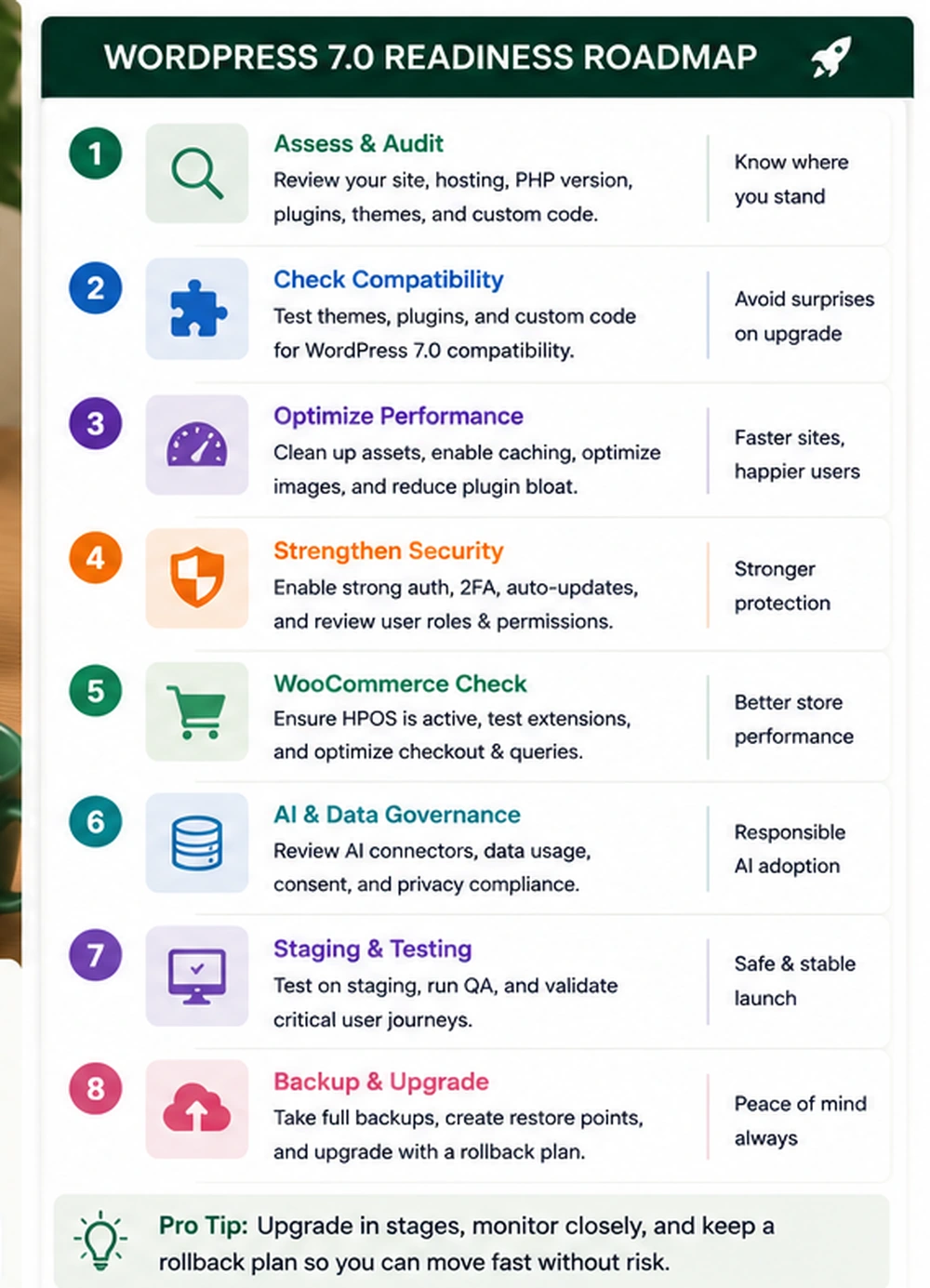
The safest approach is phased.
Step 1: Inventory the site
Document WordPress version, WooCommerce version, PHP version, database version, hosting stack, theme, plugins, custom code, payment gateways, shipping tools, analytics, CRM integrations, and business-critical pages.
Step 2: Create a real staging copy
Use a staging site that closely matches production. If the site handles customer data, sanitize sensitive information while preserving enough realistic structure to test product, order, and account flows.
Step 3: Update in staging
Run the update in staging. Watch logs. Check admin warnings. Review broken blocks, JavaScript errors, fatal errors, layout shifts, missing assets, and plugin notices.
Step 4: Test critical journeys
For business websites, test forms, navigation, landing pages, contact flows, CRM submissions, analytics, search, and mobile layouts.
For WooCommerce, test cart, checkout, payment, shipping, tax, coupons, emails, accounts, refunds, and admin orders.
Step 5: Compare performance
Run before and after tests. Pay attention to mobile. Check Core Web Vitals, TTFB, LCP, INP, CLS, JavaScript weight, image handling, and checkout speed.
Step 6: Review SEO output
Check titles, canonicals, schema, breadcrumbs, sitemaps, redirects, robots settings, internal links, and key landing pages.
Step 7: Prepare rollback
A rollback plan should include files, database, media, plugins, theme, and server settings. Make sure the backup can actually be restored.
Step 8: Deploy during a planned window
Schedule the production update when the team can monitor. Watch orders, forms, emails, error logs, speed, analytics, and support tickets.
Step 9: Run post-launch monitoring
The first week matters. Track errors, checkout issues, failed payments, form submissions, indexing changes, speed shifts, and editor feedback. Document fixes for future maintenance.
When to upgrade, when to rebuild
Not every site should be upgraded as-is. A rebuild may be smarter when the current site is fragile.
Consider a rebuild if the theme is abandoned, plugins are excessive, custom code is undocumented, performance is poor, the editor is hard to use, WooCommerce templates are heavily patched, checkout is unreliable, or the site no longer matches the business.
A rebuild should not be only a new look. It should improve performance, content operations, security, technical SEO, checkout reliability, and long-term maintainability. Cuibit's WordPress Core Web Vitals turnaround shows why performance problems often require technical cleanup, not only design changes.
Common mistakes to avoid
Updating production without staging
This is the classic mistake. A live business site should not be the test environment.
Testing only the homepage
The homepage can look fine while checkout, forms, account pages, product templates, or SEO output break.
Ignoring admin workflows
Editors, store managers, and support teams need to do their work after the update. Admin speed and usability matter.
Keeping every plugin forever
Unused plugins increase risk. The upgrade plan should include plugin cleanup.
Treating backups as enough
Backups matter, but a backup that has not been restored is unproven. Test rollback before launch pressure.
Forgetting maintenance
Readiness is not a one-time task. Ongoing WordPress maintenance support keeps the site safer after the major release.
A buyer checklist for WordPress 7.0 readiness
Before approving an internal upgrade or hiring a partner, ask:
- Have we documented the current theme, plugins, hosting, and custom code?
- Does staging match production closely enough to trust the test?
- Has the backup been restored successfully before?
- Have we tested forms, checkout, payments, shipping, coupons, and emails?
- Have we tested editor workflows and user roles?
- Have we checked block editor, theme.json, and template behavior?
- Have we measured performance before and after?
- Have we reviewed schema, sitemaps, canonicals, and redirects?
- Have we documented all compatibility issues?
- Do we have a rollback plan and launch owner?
If the answers are unclear, the upgrade plan needs more work.
What Cuibit would inspect first
For a business site, Cuibit would start with the pages and workflows that carry commercial risk. That usually means service pages, forms, analytics, CRM submissions, WooCommerce checkout, product templates, payment behavior, order emails, and the admin workflows used by editors or store managers. The technical audit would then move into the theme, plugin stack, custom code, hosting, cache configuration, security settings, and SEO output. This order matters because a site can technically update while still failing the business. A readiness project should protect the journeys that create leads, orders, and trust before it optimizes less important sections of the site.
Editorial conclusion
WordPress 7.0 is a chance to improve how business websites are built, edited, tested, and maintained. It is also a reminder that WordPress sites are living systems. A modern site includes hosting, plugins, theme code, content workflows, analytics, forms, SEO, WooCommerce, performance, and security.
The right response is not fear and not blind updating. It is preparation. Inventory the site. Build staging. Test the journeys that matter. Review performance and SEO. Clean the plugin stack. Plan rollback. Monitor after launch.
Businesses that prepare early will be able to use the new platform direction with more confidence. Businesses that wait until release pressure starts may discover that their real problem was never WordPress 7.0. It was years of unmanaged technical debt.
Need this advice turned into a real delivery plan?
We can review your current stack, pressure-test the tradeoffs in this guide and turn it into a scoped implementation plan for your team.