Cuibit publishes insights from shipped delivery work across web, WordPress, AI and mobile. Articles are written for real buying and implementation decisions, then updated as the stack or the advice changes.
Cuibit WordPress Performance
WordPress and WooCommerce delivery team
The Cuibit team focused on custom WordPress builds, WooCommerce systems, Core Web Vitals and long-term maintainability.
Key takeaways
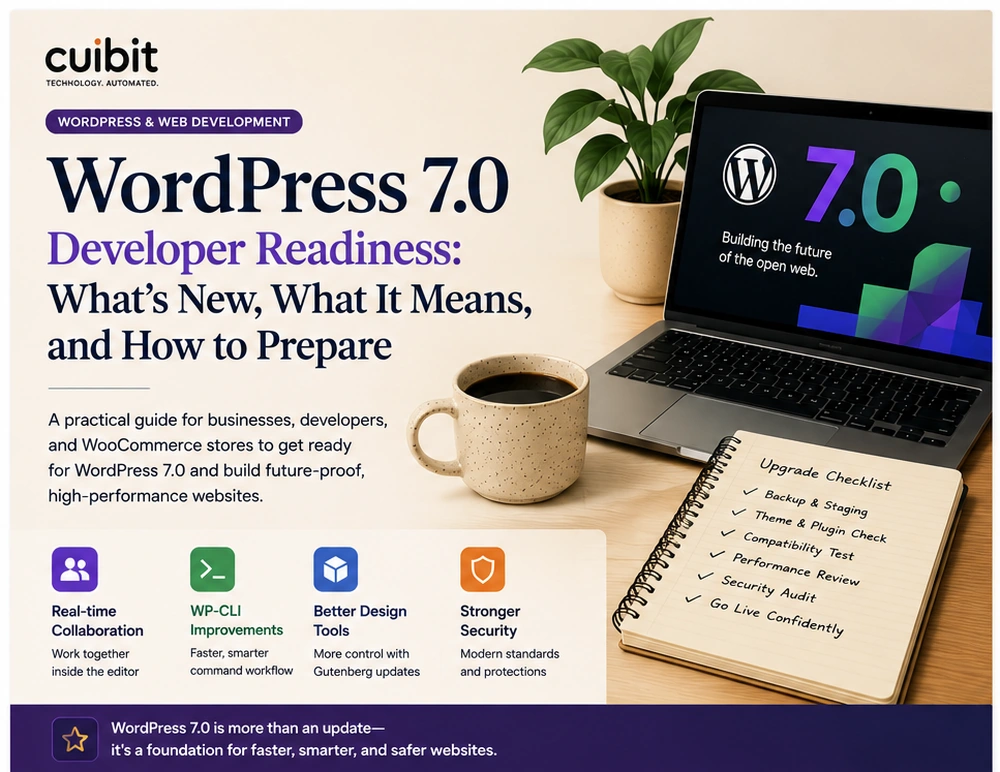
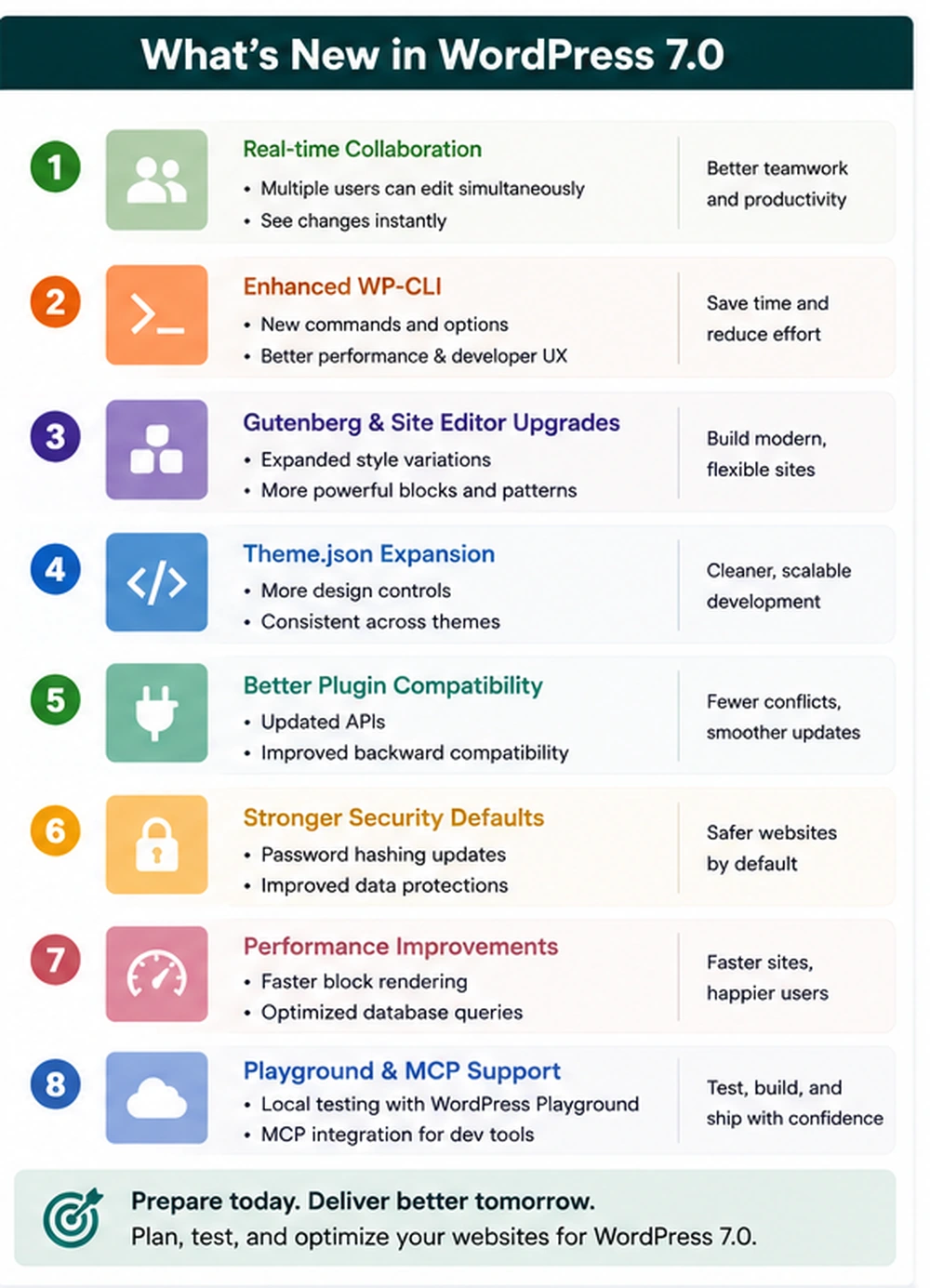
- WordPress 7.0 is shaping up as a workflow-focused release, not just a routine CMS update. Real-time collaboration, Gutenberg improvements, developer tooling, Playground and MCP support, and AI-related APIs are all signals that WordPress is becoming a more collaborative publishing and application platform.
- WooCommerce stores should not wait until release week to prepare. Stores need a staging environment, plugin compatibility checks, checkout testing, HPOS review, performance baseline, theme audit, backup plan, and rollback process before touching production.
- Content-heavy business websites should pay special attention to editorial workflows. Real-time collaboration can improve content operations, but it also changes how teams think about permissions, review stages, drafts, revisions, and client approvals.
- Custom WordPress builds need developer review. Block themes, custom blocks, theme.json, Interactivity API usage, plugins, scripts, caching, and admin customizations should be checked before the upgrade.
- Performance should be measured before and after the upgrade. WordPress 7.0 readiness is a chance to clean slow plugins, optimize images, reduce database bloat, improve caching, and fix Core Web Vitals issues rather than simply click Update.
- The safest business plan is a phased upgrade: inventory, staging, compatibility testing, performance testing, user acceptance testing, backup, deployment window, and post-launch monitoring.
Why this topic matters now
WordPress 7.0 is one of the most important WordPress milestones for business websites in 2026 because it continues the shift from WordPress as a simple publishing system to WordPress as a collaborative workflow and application platform. The most visible headline is real-time collaboration, but the practical impact is broader. Developer tooling, Gutenberg changes, API work, Playground improvements, and plugin compatibility all matter for companies that depend on WordPress for revenue, leads, editorial publishing, ecommerce, and customer experience.
For a small brochure site, the upgrade may be straightforward. For a WooCommerce store, membership site, booking platform, publisher, multilingual website, or custom WordPress application, the upgrade deserves planning. A business cannot treat WordPress 7.0 like a minor patch if the site includes custom checkout logic, role-based pricing, subscription flows, third-party integrations, custom blocks, heavy page builder usage, or complex editorial workflows.
This is where the conversation becomes more than WordPress news. It becomes a business-readiness problem. A website that generates revenue should have an upgrade process. A WooCommerce store should have a test plan. A content team should understand how collaborative editing affects permissions and review. A developer should inspect the theme and plugin stack before production is updated.
For Cuibit, the topic connects directly to WordPress development services, WooCommerce development, WordPress speed work, maintenance, and custom platform support. The goal is not fear. The goal is a practical upgrade plan that protects the business while helping it benefit from the platform's next stage.
What WordPress 7.0 changes for business websites
The largest strategic change is that WordPress is moving toward shared workflows. Real-time collaboration means multiple users can work closer to the same content experience instead of relying only on handoffs, duplicated drafts, screenshots, or external document tools. For editorial teams, agencies, and clients, this can reduce friction.
But collaboration changes the control model. Businesses will need to think about who can edit, who can approve, who can publish, who can see drafts, and how content is reviewed. A marketing manager may love simultaneous editing, but a compliance-driven business may need stronger approval rules before the feature is widely used.
The second change is the ongoing Gutenberg and block-editor evolution. WordPress is increasingly structured around blocks, patterns, global styles, and theme.json. This is good for maintainability when the site is built well. It is risky when a site relies on old theme hacks, fragile shortcodes, outdated page builder workarounds, or plugins that inject unpredictable markup.
The third change is developer tooling. WordPress Playground and MCP-related tooling are making it easier for developers to test, prototype, and inspect WordPress environments more quickly. That matters because safe upgrades require testing. A business that can quickly reproduce a site state, test plugin behavior, and review compatibility has less production risk.
The fourth change is AI-related infrastructure. WordPress is experimenting with APIs and connector patterns that may let plugins work with AI systems more consistently. Businesses should not rush to add AI features just because the platform supports them, but they should recognize the direction: WordPress is becoming more programmable, more connected, and more workflow-oriented.
Why WooCommerce stores need a stricter upgrade plan
WooCommerce stores are different from normal WordPress sites because they handle transactions. A broken blog layout is inconvenient. A broken checkout is lost revenue. A pricing bug can create financial loss. A shipping miscalculation can create customer service problems. A plugin conflict can block orders.
That is why WooCommerce upgrade readiness should be stricter.
A store owner should test these areas before production:
- product pages
- category pages
- cart behavior
- checkout flow
- payment gateways
- shipping methods
- taxes
- coupons and discounts
- order emails
- customer account pages
- refunds
- subscriptions or memberships
- inventory updates
- search and filters
- analytics and conversion tracking
- admin order screens
- role-based pricing or wholesale flows
- multilingual or multi-currency behavior
A WooCommerce store with custom logic needs even more care. Custom checkout fields, ERP integrations, CRM sync, abandoned cart tools, product importers, subscription plugins, marketplace extensions, and custom fulfillment flows can all behave differently after a major platform update.
The right approach is to test the upgrade in staging, compare the customer journey, then deploy during a low-risk window with backups and rollback ready. This is especially important for stores with high order volume, seasonal campaigns, paid traffic, or B2B purchasing workflows.
Cuibit's B2B WooCommerce rebuild work is a good reminder that ecommerce readiness is often about more than design. Catalog structure, pricing logic, user roles, performance, and checkout reliability all need attention.
The WordPress 7.0 readiness audit
A practical readiness audit should inspect six layers: hosting, theme, plugins, custom code, content workflow, and performance.
1. Hosting and environment
Start with the environment. Check PHP version, database version, server resources, caching layer, object cache, CDN setup, backup process, and staging availability. A weak hosting environment can make any upgrade harder.
The business should confirm:
- there is a recent full backup
- the backup can be restored
- staging matches production closely
- PHP and database versions are supported
- error logging is enabled
- object caching is configured where appropriate
- cron jobs are working
- deployment steps are documented
Many WordPress issues are blamed on updates when the underlying problem is hosting, caching, or server configuration. Fix the foundation first.
2. Theme and block structure
Next, inspect the theme. Is it a classic theme, a block theme, a child theme, or a heavily customized commercial theme? Does it rely on outdated template overrides? Does it use theme.json correctly? Are custom blocks maintained? Are global styles clean?
A WordPress 7.0 upgrade is a good time to reduce old theme debt. If the theme has years of patched templates, duplicated CSS, hardcoded layout sections, or unused builder elements, a direct upgrade may preserve the mess. In some cases, custom WordPress development is the safer path because the business needs a cleaner architecture, not another layer of fixes.
3. Plugin compatibility
Plugins are the most common source of upgrade risk. Create an inventory before testing. Group plugins into categories:
- ecommerce
- payments
- shipping
- SEO
- analytics
- forms
- security
- caching
- page building
- custom fields
- memberships
- subscriptions
- multilingual
- backups
- integrations
- admin utilities
Then mark which plugins are business-critical. A payment plugin, shipping plugin, or membership plugin deserves more attention than a minor admin helper.
The best plugin stack is not the largest one. It is the one where every plugin has a clear purpose, active maintenance, compatibility history, and measurable business value.
4. Custom code
Custom code can live in a theme, child theme, plugin, mu-plugin, snippets plugin, custom block, API integration, or server config. Find it before the upgrade.
For each custom code area, ask:
- What business function does it support?
- Who maintains it?
- Does it rely on deprecated WordPress or WooCommerce hooks?
- Does it affect checkout, pricing, access, or user data?
- Is it covered by tests or manual QA?
- Can it be rolled back quickly?
Custom code is not bad. Untracked custom code is risky.
5. Content and editorial workflow
WordPress 7.0's collaboration direction makes editorial workflow more important. A company should review roles and permissions before enabling broad collaborative editing.
Questions to ask:
- Who can create drafts?
- Who can edit published pages?
- Who can approve changes?
- Who can publish?
- Who can change templates or global styles?
- Who can edit product content?
- Who can change navigation?
- Who can access private content?
For agencies and client teams, this matters. A collaborative editor can improve productivity, but it can also create confusion if multiple people are changing content without clear ownership.
6. Performance baseline
Measure performance before the upgrade. Capture Core Web Vitals, page speed, database query health, admin speed, checkout speed, and server response time. Then test again after the upgrade.
Important pages include:
- homepage
- main service pages
- top blog pages
- product pages
- category pages
- cart
- checkout
- account pages
- forms
- landing pages used in campaigns
A WordPress 7.0 upgrade should not become an excuse for slower pages. If performance is already weak, consider WordPress speed optimization before or during the upgrade project.
A practical upgrade plan
The safest upgrade process has eight steps.
Step 1: Create a full inventory
Document WordPress version, WooCommerce version, PHP version, hosting stack, theme, plugins, custom code, payment gateways, shipping tools, integrations, and business-critical pages.
This inventory gives the team a shared understanding of what needs to be tested.
Step 2: Create a real staging copy
Do not test on production. Build a staging site that closely matches production. The staging site should include the current theme, plugins, content, WooCommerce settings, and representative order data where safe.
If sensitive customer data is involved, sanitize it. Test realism should not mean exposing private data.
Step 3: Run the update in staging
Update WordPress, WooCommerce, plugins, and theme files in a controlled order. Record what changes. Watch logs. Check for fatal errors, admin warnings, broken blocks, failed scripts, and layout issues.
Step 4: Test business-critical journeys
For a business website, test forms, navigation, search, service pages, landing pages, contact flows, analytics, and CRM integrations.
For WooCommerce, test the full purchase flow. Add products to cart, apply coupons, calculate shipping, process test payments, check order emails, view account pages, and review admin order handling.
Step 5: Test roles and collaboration
If the site uses multiple editors, test how real-time collaboration and editor changes affect the content team. Confirm that roles, permissions, drafts, revisions, and publishing workflows still make sense.
Step 6: Compare performance
Run before-and-after performance tests. Check frontend pages and admin screens. If the upgrade exposes slow queries, heavy scripts, or plugin conflicts, fix them before production.
Step 7: Prepare rollback
A rollback plan should include files, database, plugins, theme, media, and server settings. The team should know who can execute rollback and how long it takes.
A backup that has never been restored is only a theory.
Step 8: Deploy during a planned window
Schedule the production upgrade when traffic and order volume are lower. Keep the team available after launch. Watch logs, forms, orders, payment status, email sending, analytics, and user reports.
What to do if the site uses Elementor or a page builder
Many business websites use Elementor or another page builder. These sites need special care because builder output, theme styles, scripts, and plugin dependencies can interact with WordPress core changes.
Before upgrading:
- update the builder in staging
- test global templates
- test headers and footers
- test forms
- test popups
- inspect responsive layouts
- check script loading
- review custom CSS
- check WooCommerce templates
- test dynamic content widgets
If the site has grown heavy over time, an upgrade may reveal performance problems that already existed. For businesses that depend on Elementor, working with an Elementor expert can help separate builder issues from core WordPress issues.
When a rebuild is smarter than an upgrade
Sometimes a direct upgrade is not the best move. A rebuild may be smarter when the current site is structurally weak.
Consider a rebuild if:
- the theme is abandoned
- the page builder setup is bloated
- the site has too many fragile plugins
- custom code is undocumented
- performance is poor across key pages
- WooCommerce templates are heavily patched
- editors cannot manage content safely
- the design system is inconsistent
- checkout is unreliable
- the business model has changed
A rebuild should not be cosmetic. It should improve performance, maintainability, content workflow, ecommerce reliability, and search visibility. Cuibit's WordPress Core Web Vitals turnaround example is relevant because performance often requires technical cleanup, not just visual changes.
How WordPress 7.0 affects technical SEO
A major upgrade can affect technical SEO even when content stays the same.
Check:
- page titles and meta descriptions
- canonical tags
- XML sitemaps
- robots settings
- redirects
- schema output
- breadcrumbs
- headings
- internal links
- pagination
- product structured data
- image alt text
- mobile layout
- Core Web Vitals
If the upgrade changes templates, schema plugins, navigation, breadcrumbs, or product markup, search engines may see meaningful differences. This is not always bad. A cleaner site can improve visibility. But the team should know what changed.
For WordPress sites that rely heavily on organic traffic, Cuibit's WordPress SEO audit checklist can be used alongside the upgrade plan.
Maintenance after launch
The upgrade is not finished when production loads. The first week after launch matters.
Monitor:
- error logs
- checkout errors
- failed payments
- contact form submissions
- email deliverability
- page speed
- admin speed
- broken layouts
- search indexing
- analytics tracking
- customer support tickets
- editor feedback
Then schedule a cleanup sprint. Remove unused plugins, document custom code, update staging procedures, improve backups, and refine the content workflow. Ongoing WordPress maintenance support is often the difference between a stable business site and a site that becomes risky again after the next few plugin updates.
A buyer checklist for WordPress 7.0 readiness
Before hiring a WordPress team or approving an internal upgrade plan, ask:
- Have we documented the current theme, plugins, integrations, and custom code?
- Do we have a staging copy that matches production?
- Has the backup been tested?
- Have we tested checkout, payments, shipping, coupons, and emails?
- Have we tested forms and CRM integrations?
- Have we tested user roles and editorial permissions?
- Have we checked block editor and template behavior?
- Have we compared performance before and after?
- Have we reviewed SEO templates and schema?
- Do we have a rollback plan?
- Do we know who owns post-launch monitoring?
- Have we documented any fixes made during the upgrade?
If the answer to several of these questions is no, the upgrade plan is not ready.
Editorial conclusion
WordPress 7.0 is not just another update button. It is part of WordPress's move toward collaborative workflows, stronger developer tooling, and more flexible content architecture. For businesses, that creates opportunity. Teams can publish faster, manage content more efficiently, and build more maintainable websites.
But opportunity does not remove risk. WooCommerce stores, custom WordPress builds, page-builder sites, and content-heavy businesses need a careful upgrade process. The goal is not to delay progress. The goal is to protect revenue, preserve search visibility, improve performance, and make the website easier to manage after the upgrade.
The best time to prepare is before release pressure starts. Audit the site, create staging, test the business-critical journeys, review performance, confirm rollback, and document what changed. That is how a WordPress 7.0 upgrade becomes a business improvement instead of a production emergency.
Need this advice turned into a real delivery plan?
We can review your current stack, pressure-test the tradeoffs in this guide and turn it into a scoped implementation plan for your team.