Cuibit publishes insights from shipped delivery work across web, WordPress, AI and mobile. Articles are written for real buying and implementation decisions, then updated as the stack or the advice changes.
Cuibit Web Engineering
Web architecture and technical SEO team
The Cuibit team covering web architecture, Next.js delivery, technical SEO and buyer-facing product surfaces.
Key takeaways
- Start with indexability, not plugins. If Google cannot crawl, index, and understand the page, nothing else matters.
- Core Web Vitals still matter in 2026. LCP, INP, and CLS are not the whole algorithm, but poor page experience makes good content harder to win with.
- Google’s AI search features do not require a special “AI SEO hack.” The same fundamentals still matter: crawlability, internal links, helpful text, and structured data that matches what users can see.
- Most WordPress SEO problems are operational, not theoretical. Broken canonicals, thin templates, slow page builders, weak internal linking, and outdated pages are far more common than exotic ranking issues.
- A good audit is a prioritization system. The goal is not to find 200 issues. The goal is to fix the 20 issues that actually move rankings, traffic, and conversions.
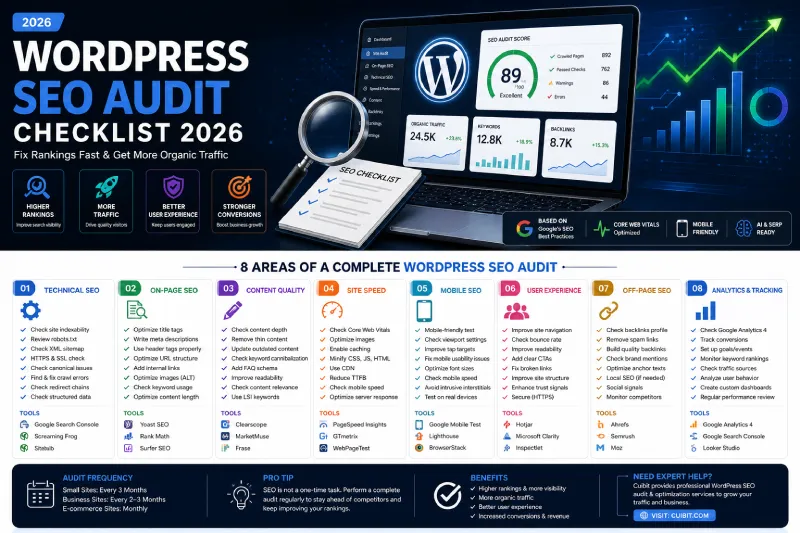
If you want the short answer first, here it is: a strong WordPress SEO audit checklist in 2026 starts with crawlability, indexation, intent alignment, Core Web Vitals, and internal linking. After that, you tighten content quality, schema, media, and analytics so your site is easy for both users and Google to understand.
Why a WordPress SEO audit matters more in 2026
A few years ago, many site owners treated SEO audits as something you ran after rankings dropped. That approach is too reactive now. Search is more dynamic, competition is tighter, and Google’s AI-powered search experiences reward sites that are already technically sound, easy to interpret, and clearly useful.
That changes the purpose of an audit. A modern audit is not just a “find broken meta tags” exercise. It is a way to answer five business-critical questions:
- Can Google crawl and index the right pages?
- Do those pages satisfy the actual search intent behind the keyword?
- Is the site fast, stable, mobile-friendly, and easy to navigate?
- Is the content strong enough to compete with what already ranks?
- Are we giving Google enough structured, consistent signals to trust and surface the site?
For WordPress sites, this matters even more because many issues come from the way the site is built and maintained. Theme bloat, old plugins, page-builder sprawl, duplicate archives, unnecessary tag pages, badly handled redirects, weak templates, and low-quality publishing habits can all create silent SEO drag.
That is why serious sites should not wait for a traffic drop before they audit. They should treat the audit as a recurring operating system.
What “Google AI SEO” actually means for a WordPress audit
There is a lot of noise around “AI SEO,” “GEO,” and similar labels. The practical reality is simpler.
For a WordPress site, Google AI search visibility still depends on the same foundational conditions that have always mattered:
- the page must be crawlable
- the page must be indexable
- important content should be available in text form
- internal links should help Google discover and connect pages
- page experience should be solid
- structured data should match the visible content
- the content itself should be useful, reliable, and complete
That means your audit should not chase gimmicks. It should make the site easier to understand, easier to trust, and easier to surface.
In other words: Google AI SEO starts with good SEO.
The 8-part WordPress SEO audit checklist for 2026
1. Technical SEO and crawlability
This is where the audit starts because technical failures block everything else.
Check the following first:
- Is the site indexable in WordPress settings?
- Are important URLs returning a
200status code? - Are there unnecessary
301,302,404, or5xxresponses? - Is
robots.txtblocking anything critical? - Does the XML sitemap include the right pages and exclude junk?
- Are canonicals correct on posts, pages, category pages, and archives?
- Are duplicate URLs being created by parameters, archives, search pages, or tag pages?
- Are redirects clean after migrations or URL changes?
- Is the preferred domain consistent?
- Is HTTPS enforced sitewide?
For WordPress, this section often reveals the highest-impact problems. A few common examples:
- category pages indexed even though they add no value
- attachment pages getting indexed
- multiple versions of the same URL
- staging or preview URLs leaking into indexation
- old redirects from redesigns still unresolved
- page-builder landing pages with thin or duplicate content
Fix priority: very high. If crawl/index signals are broken, address them before on-page polishing.
2. On-page SEO basics
Once the pages are technically accessible, move into page-level optimization.
Audit:
- title tags
- meta descriptions
- H1 usage
- heading hierarchy
- URL structure
- image alt text
- breadcrumb consistency
- internal anchor text
- keyword-to-page mapping
Look for pages where the title tag does not match the real search intent. This is one of the most common WordPress SEO problems. A page may be technically “optimized” but still target the wrong angle. For example, a service page may read like an agency brochure when the user actually wants a pricing guide, comparison, checklist, or tutorial.
Good on-page SEO in 2026 is less about stuffing variants and more about clarity:
- Does the title clearly state what the page offers?
- Does the intro answer the query fast?
- Are the headings useful, descriptive, and scannable?
- Does the page cover the topic more completely than competing pages?
3. Content quality and intent alignment
This is where many audits become valuable.
Do not just ask whether a page has keywords. Ask whether it deserves to rank.
Review:
- thin pages
- outdated articles
- duplicate topics
- template-heavy pages with little original value
- pages with weak intros
- content that never answers the query directly
- posts that target informational intent when the query is actually commercial
- category or landing pages with no supporting context
A high-quality content audit usually includes these questions:
- Does the page provide original analysis, examples, or practical guidance?
- Does it answer the likely next question the user has?
- Does it sound like it was written for a person trying to solve something?
- Is the topic still current?
- Would this page still be useful if search engines did not exist?
That last question is powerful. It removes a lot of fake SEO writing from the system.
For WordPress content specifically, check whether old posts are cannibalizing each other. Many sites publish too many weak articles around adjacent keywords instead of consolidating them into stronger assets.
4. Internal linking and site architecture
Internal linking is one of the most underrated parts of a WordPress SEO audit.
A strong internal link structure does three things at once:
- helps Google discover pages
- reinforces topical relationships
- pushes users toward the next useful or commercial step
Audit:
- orphan pages
- weakly linked service pages
- overlinked low-value pages
- repetitive anchor text
- missing links from blog content to commercial pages
- missing hub pages for topic clusters
- shallow navigation around important content
For Cuibit-style sites, this is especially important because high-value service pages should receive support from educational content.
Examples of relevant internal links for this article include:
- WordPress Development Services
- Custom WordPress Development
- WordPress Speed Optimization
- WordPress Maintenance Support
- Web Development Services
That kind of internal architecture strengthens both SEO and conversion flow.
5. Core Web Vitals and page experience
A WordPress SEO audit in 2026 is incomplete if it does not include page experience.
Measure:
- LCP (loading performance)
- INP (interaction responsiveness)
- CLS (visual stability)
In practice, WordPress sites usually struggle with:
- oversized hero images
- delayed or blocking scripts
- page-builder bloat
- too many third-party apps
- layout shifts from ads, popups, cookie banners, or dynamic UI elements
- poor mobile rendering
- weak caching
- unoptimized fonts and icon libraries
A practical page experience audit should answer:
- What is the largest visible element on key templates?
- What script or element is causing poor interactivity?
- What is shifting after the first render?
- What can be lazy-loaded, deferred, or removed?
For most WordPress sites, the fastest gains often come from:
- compressing and resizing media
- removing unnecessary plugins
- limiting third-party embeds
- improving caching and image delivery
- simplifying complex above-the-fold sections
- reducing builder-generated DOM bloat
This is where pages like WordPress Speed Optimization become highly relevant from both a user and internal-linking perspective.
6. Schema, SERP features, and visible consistency
Structured data is not a ranking cheat code, but it is an important part of a professional audit.
Check whether the site has valid and useful schema for:
- Organization
- WebSite
- BreadcrumbList
- Article
- FAQPage where appropriate
- Product or service-related markup when relevant
The most important rule: schema must match the visible page content.
Do not add markup for elements that are not truly on the page. That creates inconsistency and weakens trust.
For WordPress sites, the audit should also check whether your SEO plugin output is:
- valid
- consistent across templates
- not duplicated by theme or custom code
- not broken by page-builder modules
Also review how your titles, snippets, images, breadcrumbs, and dates appear in search. Search appearance is part of SEO, not a separate design concern.
7. AI search readiness
This is the new section many audits miss.
The goal is not to invent a special “AI file.” The goal is to make the page easier for Google’s systems to interpret, quote, and connect.
Check:
- whether the page answers the core question early
- whether headings are descriptive and logically nested
- whether important definitions and steps are written in clear text
- whether the page includes concise summaries and detailed sections
- whether key concepts are supported by examples
- whether images support the text rather than replace it
- whether the page has helpful internal links to adjacent resources
- whether important content is hidden inside accordions, tabs, sliders, or client-side interactions
- whether the page is eligible to show with a snippet in Search
Good “AI search readiness” often looks like good editorial structure:
- direct answer near the top
- scannable sections
- useful bullets
- clear terminology
- strong context
- reliable supporting details
- no fluff
8. Analytics, conversion tracking, and monitoring
The audit should finish where many audits forget to look: measurement.
Audit:
- Google Search Console verification
- GA4 setup
- conversion tracking on forms and calls
- event tracking for key user actions
- internal search tracking if relevant
- landing page performance by query cluster
- page templates with strong impressions but weak CTR
- pages with traffic but weak conversion flow
This matters because SEO is not only about ranking. It is about whether rankings turn into business outcomes.
A page that ranks but does not convert may still need changes to:
- headline clarity
- CTA placement
- trust signals
- case-study links
- page structure
- next-step friction
A practical prioritization framework
Do not try to fix everything at once. Use this priority order:
| Priority | Focus area | Why it comes first | |---|---|---| | 1 | Crawlability and indexation | Pages must be accessible and eligible to rank | | 2 | Search intent mismatch | Wrong intent kills rankings even on technically clean pages | | 3 | Core Web Vitals on key templates | Page experience affects visibility and conversion | | 4 | Internal linking and site architecture | Helps discovery, context, and commercial flow | | 5 | Content quality upgrades | Necessary for competitive wins and AI search clarity | | 6 | Schema and search appearance | Improves understanding and presentation | | 7 | Tracking and reporting | Lets you validate wins and spot hidden losses |
This is how real teams move faster: by fixing the highest-leverage issues first.
Tools to use in a WordPress SEO audit
You do not need 20 tools. A practical stack is enough.
Core tools:
- Google Search Console
- Google Analytics 4
- PageSpeed Insights
- Rich Results Test
Technical crawling tools:
- Screaming Frog
- Sitebulb if preferred
WordPress-specific support:
- Yoast or Rank Math for baseline SEO controls
- a reliable redirection manager
- image optimization tooling
- performance monitoring and caching tools
Behavior and UX review:
- Microsoft Clarity
- Hotjar if useful for larger sites
Common WordPress SEO audit mistakes
Mistake 1: treating plugin settings as the whole audit
SEO plugins help, but they do not solve architecture, speed, intent, content quality, or UX.
Mistake 2: optimizing low-value pages first
Do not spend two hours tuning a tag archive while your top service page has weak intent alignment and poor mobile UX.
Mistake 3: auditing without a content strategy
Technical fixes matter, but many WordPress sites plateau because their content is too generic or scattered.
Mistake 4: ignoring internal links
Pages do not rank in isolation. They rank in context.
Mistake 5: assuming AI search needs totally different SEO
In reality, AI-facing visibility still depends on strong fundamentals, clear text, and crawlable, trustworthy pages.
How often should you run a WordPress SEO audit?
A sensible schedule looks like this:
- Every quarter for most business websites
- Monthly for larger content operations or ecommerce
- After every redesign, migration, or major plugin change
- Immediately after a measurable traffic drop
Sites that publish often or change often should audit more often.
Cuibit-oriented implementation opportunities
This article should not just diagnose issues. It should also create relevant next steps for readers.
Where it makes sense, guide readers to:
- WordPress Development Services
- Custom WordPress Development
- WordPress Speed Optimization
- WordPress Maintenance Support
- Web Development Services
That is a better internal-linking pattern than dropping generic links everywhere. Each link should feel like a logical next step.
Editorial conclusion
The best WordPress SEO audit checklist in 2026 is not the longest one. It is the one that helps you fix the right things in the right order.
If the site is technically broken, fix that first. If it is slow, improve the templates that matter most. If it is indexing the wrong pages, clean that up. If the content is generic, rewrite it so it actually helps people and deserves visibility.
That is how you move rankings fast: not by chasing tricks, but by making the site easier to crawl, easier to trust, easier to use, and more useful than what already ranks.
Need this advice turned into a real delivery plan?
We can review your current stack, pressure-test the tradeoffs in this guide and turn it into a scoped implementation plan for your team.