Cuibit publishes insights from shipped delivery work across web, WordPress, AI and mobile. Articles are written for real buying and implementation decisions, then updated as the stack or the advice changes.
Cuibit WordPress Performance
WordPress and WooCommerce delivery team
The Cuibit team focused on custom WordPress builds, WooCommerce systems, Core Web Vitals and long-term maintainability.
Key takeaways
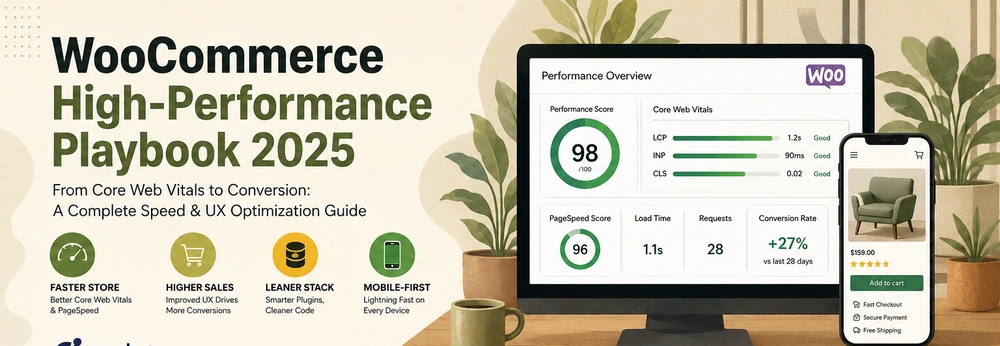
- WooCommerce performance in 2026 is not only about a faster homepage. It is about product-page speed, category-page crawlability, cart responsiveness, checkout reliability, plugin hygiene, database health and security patch discipline.
- Recent WordPress vulnerability activity shows why ecommerce teams should treat plugin governance as part of performance work. A store can be technically fast and still risky if critical plugins, builders, payment extensions or admin tools are unmanaged.
- The strongest WooCommerce improvements usually come from template-level fixes: product images, cart fragments, app-like filters, checkout scripts, review widgets, page-builder output, caching rules and database cleanup.
- Core Web Vitals matter because they reflect real customer friction. LCP affects first impression, INP affects interaction quality, and CLS affects trust during browsing and checkout.
- AI search and shopping assistants make technical clarity more important, not less. Product data, schema, category structure, internal links and fast crawlable pages help both humans and machines understand the store.
- The safest plan is a staged audit: baseline, hosting, database, plugin stack, media, frontend UX, checkout, security, monitoring and continuous improvement.
Why this topic matters now
WooCommerce remains one of the most flexible ecommerce systems for businesses that want WordPress content control, custom product logic and ownership of their platform. That flexibility is valuable. It also creates responsibility. A WooCommerce store can become fast, stable and profitable, or it can become a slow stack of themes, plugins, scripts, widgets, checkout extensions and legacy snippets that nobody wants to touch.
The pressure is rising in 2026. Customers expect mobile product pages to load quickly. Google continues to use page experience and Core Web Vitals as part of the broader search-quality picture. AI-assisted discovery systems need clean, structured, crawlable product and category pages. Security researchers continue to disclose WordPress plugin vulnerabilities. Merchants continue adding more tools for reviews, analytics, subscriptions, popups, shipping, tax, chat, product filters and personalization.
That combination makes WooCommerce performance a business issue. The question is not “can we improve the score?” The better question is “can the store stay fast, secure and understandable as the catalog, traffic, integrations and marketing stack grow?”
For Cuibit, this sits directly across WooCommerce development, WordPress speed optimization, WordPress maintenance support, backend reliability and ecommerce technical SEO. A serious store needs more than a plugin recommendation. It needs an operating model.
The mistake: treating speed and security as separate problems
Many ecommerce teams separate performance and security. One person handles caching. Another handles plugin updates. A third handles SEO. A fourth handles conversion. That separation creates blind spots.
A slow plugin can also be a risky plugin. A page builder can create Core Web Vitals problems and expose the business to urgent patch cycles. A review widget can improve trust and slow product pages at the same time. A product-filter plugin can help conversion while creating crawl waste and heavy database queries. A payment extension can be essential for revenue and still require careful updates.
A modern WooCommerce audit should therefore ask two questions at once:
- Does this component make the store faster, clearer or more profitable?
- Does this component increase maintenance, security or operational risk?
The best stores are not the ones with the fewest features. They are the ones where every feature earns its place and has an owner.
Layer 1: baseline the store by template, not only by homepage
The homepage is usually not where revenue is won or lost. For many WooCommerce stores, the most important templates are product pages, category pages, search results, cart, checkout, account pages and campaign landing pages.
Start by measuring:
- top product pages by revenue
- top category pages by traffic
- pages used by paid campaigns
- cart and checkout steps
- mobile performance
- Core Web Vitals field data
- server response time
- conversion rate by template
- error logs
- abandoned checkout rate
- plugin-generated script load
This template-level view prevents the common mistake of optimizing one polished homepage while the product catalog remains slow.
For stores with organic growth goals, include technical SEO checks in the same baseline. Cuibit’s WordPress SEO audit checklist is a useful companion because performance, crawlability, schema and internal links often fail together.
Layer 2: hosting and server response
WooCommerce is dynamic. Cart fragments, sessions, logged-in customers, coupons, shipping rules, taxes, stock checks and checkout flows all create server work. Cheap shared hosting can make those tasks unreliable under pressure.
Review:
- PHP version
- PHP workers
- database resources
- object caching
- Redis or equivalent cache layer
- CDN configuration
- server-level page cache
- cache exclusions for cart and checkout
- cron handling
- backup process
- staging environment
- error logging
- uptime monitoring
The goal is not to buy the most expensive hosting. The goal is to match infrastructure to the store’s real workload. A small catalog with low traffic has different needs than a B2B store with customer-specific pricing or a retail store running paid campaigns.
Layer 3: database health
WooCommerce stores can accumulate database weight quickly. Orders, sessions, transients, logs, scheduled actions, product attributes, plugin tables, abandoned cart data and analytics records all add up.
Audit:
- autoloaded options
- expired transients
- WooCommerce sessions
- scheduled actions backlog
- order table health
- product lookup tables
- index usage
- slow queries
- plugin-specific tables
- old logs and temporary records
- database size by table
Database cleanup should be careful. Do not delete operational data blindly. Export, back up, stage and verify. The aim is to remove waste, not erase history that accounting, analytics or customer support might need.
For complex stores, backend review often overlaps with backend development, because slow ecommerce behavior can come from custom queries, integrations, product feeds or third-party APIs rather than WooCommerce itself.
Layer 4: plugin and builder governance
The plugin stack is the most common source of WooCommerce performance and security risk. Every plugin should have a reason to exist.
Create a plugin register with:
- plugin name
- business purpose
- technical owner
- pages affected
- frontend assets loaded
- database tables created
- update history
- known conflicts
- security history
- replacement options
- removal risk
Then classify plugins:
- essential
- useful but heavy
- duplicate
- abandoned
- risky
- replaceable by custom code
- safe to remove
Page builders deserve special review. Elementor, Divi, WPBakery, Bricks, Gutenberg blocks and custom builders can all produce strong sites when used carefully. They can also produce bloated markup, unused CSS, heavy JavaScript, layout shifts and fragile editing patterns.
If a builder is used on product pages or high-value landing pages, review the output, not only the tool name. A clean Elementor build can outperform a bad custom theme. A messy custom theme can be worse than a disciplined builder setup.
Layer 5: media and product images
Product images are often the largest visible performance bottleneck. They also affect conversion. Customers need sharp, useful media. They do not need uncompressed 4000-pixel images served to a mobile product card.
Review:
- image dimensions
- WebP or AVIF availability
- thumbnail generation
- responsive image sizes
- lazy loading behavior
- hero image priority
- product gallery loading
- category grid thumbnails
- missing width and height attributes
- alt text
- CDN delivery
- image compression settings
Do not lazy-load the most important hero image if it hurts LCP. Do not load all gallery images at full size before the customer needs them. Do reserve space for images to avoid CLS. Do make product media part of the publishing workflow, not an afterthought.
Layer 6: JavaScript and interaction quality
INP is often the hardest Core Web Vital for WooCommerce because ecommerce pages are interactive. Filters, quantity buttons, mini carts, variation selectors, reviews, sticky add-to-cart bars, analytics, chat widgets and personalization scripts can all compete on the main thread.
Review:
- cart fragment behavior
- product filter scripts
- variation selector responsiveness
- review widget load
- chat widget delay
- analytics and tag manager scripts
- popup timing
- unused scripts by template
- mobile interaction delay
- checkout field responsiveness
The goal is not to remove every script. The goal is to load scripts only where they are useful and delay anything that does not need to block the customer.
Layer 7: category pages and crawlability
WooCommerce category pages can drive serious revenue when they are well structured. They can also create crawl waste when filters, sorting, pagination and parameters generate too many URLs.
A strong category page should include:
- a useful heading
- short buying guidance
- clean product grid
- crawlable product links
- relevant filters
- canonical rules
- pagination strategy
- schema where appropriate
- internal links to related categories
- fast product-card loading
- no accidental indexation of low-value parameter URLs
This is where ecommerce SEO and engineering meet. The store must help customers choose while also helping search engines understand page relationships. Cuibit’s custom web development work often becomes useful when the standard theme and plugin stack cannot produce the right category behavior.
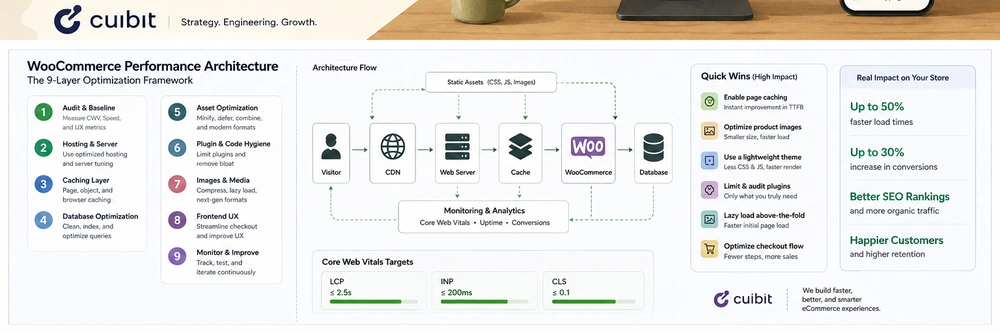
Layer 8: checkout reliability
Checkout is where performance becomes revenue. A store can pass broad speed tests and still lose money if checkout feels slow or unreliable.
Test:
- cart updates
- shipping calculation
- tax calculation
- coupon behavior
- payment gateway load
- address validation
- account creation
- guest checkout
- subscription renewals
- order emails
- mobile form usability
- error messages
- failed payment handling
- thank-you page tracking
Do not make checkout the place where every script loads. Avoid unnecessary popups. Keep trust signals clear. Make errors specific. Monitor failed orders after every plugin update.
A checkout optimization project may belong partly under ecommerce engineering, partly under UX, and partly under analytics. The business should judge it by completed orders, not only by page speed.
Layer 9: security and update discipline
Recent WordPress plugin vulnerability disclosures are a reminder that maintenance is part of ecommerce performance. A compromised store, exposed database, broken checkout or emergency patch cycle costs far more than routine governance.
A store should have:
- weekly plugin update review
- staging tests for risky updates
- vulnerability monitoring
- backups that are actually restorable
- admin account review
- strong passwords and 2FA
- least-privilege user roles
- unused plugin removal
- theme cleanup
- file integrity monitoring
- logs for suspicious behavior
- incident response plan
This matters especially for stores using page builders, custom plugins, payment extensions, product filters, subscriptions and third-party integrations.
A 30-day WooCommerce performance sprint
Week 1: measure and inventory
Capture Core Web Vitals, plugin list, hosting details, database size, checkout behavior, top templates, traffic sources, conversion data and known issues.
Week 2: fix the highest-impact template issues
Optimize product images, category grids, render-blocking assets, cart fragments, review widgets, lazy loading and layout shifts.
Week 3: clean plugins and database pressure
Remove duplicates, replace abandoned tools, reduce script load, clean safe database waste, review scheduled actions and improve object caching.
Week 4: checkout, SEO and monitoring
Test checkout, validate schema, review category crawlability, fix analytics events, monitor errors and create a maintenance routine.
What to do before a rebuild
A rebuild may be the right answer when the store is structurally weak. But many stores need cleanup before they need a rebuild.
Before approving a full rebuild, ask:
- Which templates are slow?
- Which plugins create the most overhead?
- Which pages make the most revenue?
- Which checkout issues cost orders?
- Which SEO problems affect category visibility?
- Which security risks are urgent?
- What can be fixed in 30 days?
- What genuinely requires new architecture?
Cuibit’s B2B WooCommerce rebuild example is relevant because ecommerce rebuilds should improve catalog structure, pricing logic, performance, checkout reliability and business operations, not only the visual layer.
Editorial conclusion
WooCommerce can run fast, serious ecommerce stores in 2026. But it rewards discipline. The stores that perform best are not the ones with the most plugins, the biggest themes or the busiest interfaces. They are the stores with clear architecture, clean product data, strong hosting, governed plugins, optimized media, reliable checkout and consistent maintenance.
Performance and security now belong in the same conversation. A store that is fast but risky is not healthy. A store that is secure but slow is not competitive. A store that is both fast and governed becomes easier for customers, search engines, AI systems and internal teams to trust.
The practical move is to audit what matters, fix the templates that drive revenue, simplify the stack and turn maintenance into a routine rather than a crisis.
Extra implementation detail: how to prioritize fixes
The fastest way to waste a WooCommerce optimization budget is to treat every issue as equal. Prioritize by revenue path. A problem on a top category page, product template, cart interaction or checkout step matters more than a small score issue on an old blog post. Start with the pages that receive traffic and create orders. Then compare technical effort with likely commercial impact.
Use a simple scoring model. Give each issue a traffic score, revenue score, technical difficulty score, risk score and repeatability score. A slow product image pattern that affects 2,000 products is usually more important than a decorative issue on one landing page. A checkout script that delays payment selection is more important than a tiny unused CSS file. A vulnerable abandoned plugin is more urgent than a cosmetic theme warning.
This prioritization also helps non-technical leaders understand the roadmap. Instead of receiving a long list of fixes, they see why the first sprint focuses on product media, cache rules, plugin cleanup and checkout scripts. The goal is not to make the site theoretically perfect. The goal is to improve the parts of the system that affect customers, search visibility and revenue.
What to monitor after the sprint
Optimization should end with monitoring, not silence. Track Core Web Vitals, server response time, cart errors, checkout errors, failed orders, payment gateway issues, slow queries, plugin update notices, vulnerability alerts, organic impressions, product-page conversion and support tickets. Review those numbers weekly for the first month.
If performance improves but conversion does not, investigate UX and offer quality. If conversion improves but organic visibility does not, review crawlability, schema and category architecture. If speed gains disappear after two weeks, check whether new apps, images or campaign scripts were added without governance. A store only stays fast when speed becomes part of the operating rhythm.
When to involve a developer
Some tasks are safe for an internal store manager, such as compressing images, removing unused apps in staging, rewriting category copy or documenting policies. Other tasks need a developer: database cleanup, checkout customization, PHP changes, theme refactoring, caching rules, script dequeueing, schema repair, custom plugin review and production deployment. Know the line.
The best outcome is a partnership between store operators and engineers. Store teams know which buying journeys matter. Engineers know where the system is wasting time or carrying risk. Together, they can turn WooCommerce from a collection of plugins into a governed ecommerce platform.
Need this advice turned into a real delivery plan?
We can review your current stack, pressure-test the tradeoffs in this guide and turn it into a scoped implementation plan for your team.