Cuibit publishes insights from shipped delivery work across web, WordPress, AI and mobile. Articles are written for real buying and implementation decisions, then updated as the stack or the advice changes.
Cuibit Web Engineering
Web architecture and technical SEO team
The Cuibit team covering web architecture, Next.js delivery, technical SEO and buyer-facing product surfaces.
Key takeaways
- React and Next.js websites can perform extremely well in search, but only when important content, metadata, internal links, canonical tags, structured data, and page experience signals are available reliably.
- Many React SEO problems are not content problems. They are rendering, routing, metadata, caching, hydration, JavaScript payload, or information architecture problems.
- Next.js 16 gives teams stronger foundations for server-first rendering, route-level metadata, performance work, caching, and production-grade React delivery, but it does not automatically fix search visibility.
- Business-critical pages should be audited by template: homepage, service pages, landing pages, blog posts, category pages, product pages, case studies, documentation, and location pages.
- The fastest recovery path is usually a combination of server-rendered or statically generated content, cleaner metadata, stronger internal links, structured data, Core Web Vitals improvement, and release monitoring.
- AI search does not remove technical SEO. It raises the importance of crawlable, structured, evidence-rich pages that search systems and AI answer engines can understand.
Why this topic matters now
React has become the default frontend choice for many modern websites, dashboards, SaaS platforms, marketplaces, ecommerce storefronts, and internal tools. It gives product teams component reuse, fast interface development, and strong developer experience. But the business value of React depends on more than how the site looks after JavaScript finishes loading. For public acquisition pages, the question is whether search engines, AI search systems, customers, sales teams, and analytics tools can understand the page quickly and consistently.
That question is especially important in 2026 because many companies are dealing with two pressures at the same time. First, web experiences are becoming more app-like, with interactive filters, personalized content, client-side state, headless CMS setups, and API-driven rendering. Second, search discovery is becoming more demanding. Google Search, AI Overviews, AI Mode, social previews, answer engines, and buyer research tools all need clear source pages, strong metadata, stable URLs, and evidence that a business knows what it is talking about.
A React site can look polished and still underperform in organic search. Search Console may show pages stuck in discovered-but-not-indexed status. Important pages may have low impressions despite strong copy. Titles and descriptions may be inconsistent. Schema may be missing. Product pages may fail to hold rankings. Core Web Vitals may look good on a developer machine but poor for real users. These are not always writing problems. Often, they are architecture problems.
For Cuibit, this topic connects directly to React development, Next.js development, technical SEO, SaaS engineering, ecommerce architecture, and conversion-focused web development. This guide explains how to recover search visibility without abandoning React. The right approach is not anti-JavaScript. It is server-aware, search-aware, and business-aware.
The common mistake: approving the hydrated page, not the crawlable page
Many teams review a React website by opening it in a modern browser, waiting for it to load, and checking the visual result. That is useful for design review, but it is not enough for SEO review. The browser view after hydration is not the same as the initial HTML response. A search recovery audit starts by inspecting what the server sends before JavaScript finishes.
If the initial response contains a thin shell, a loading state, and a script bundle, the page depends heavily on JavaScript execution. Search engines can render JavaScript, but businesses should not design revenue-critical acquisition pages around best-case crawler patience. The first response should already communicate the page's title, canonical URL, heading structure, meaningful body content, internal links, metadata, and schema where appropriate.
This matters because search systems operate at scale. They crawl, render, queue, compare, and index pages across massive sites. Anything that makes a page harder to interpret can delay or weaken indexing. Late-rendered content, unstable canonical tags, missing server-side metadata, hydration mismatches, and client-only navigation can all create uncertainty.
A business should ask a simple question: if JavaScript is slow, blocked, delayed, or fails, does the page still communicate its main topic and links? If the answer is no, the route is probably not ready for serious search acquisition.
Why Next.js 16 is useful for search-ready React
Next.js 16 does not guarantee rankings. It gives teams a better framework for making the right rendering decisions. The value comes from server-first architecture, route-level control, React Server Components, metadata handling, caching options, static generation, and production tooling that can reduce the SEO weaknesses of legacy single-page applications.
A healthy Next.js implementation treats different routes differently. A pricing page, case study, blog post, service page, documentation page, and product category should not behave like a private dashboard. Public acquisition pages usually need server-rendered or statically generated content. Authenticated app screens can remain more client-heavy. Mixed routes need careful design.
The biggest advantage is that Next.js lets teams send useful HTML early. That means the page can contain the main copy, headings, links, metadata, and schema without waiting for a complex client-side chain. React components still power the interface, but they do not have to hide the content until hydration.
However, Next.js can also be misused. A team can move to Next.js and still fetch critical content only on the client. They can put too much inside client components. They can generate metadata inconsistently. They can create crawl traps with query parameters. They can ship heavy JavaScript that hurts Interaction to Next Paint. They can forget schema. The framework provides tools. The implementation determines the outcome.
A route-by-route SEO recovery audit
A serious recovery plan should start with route patterns, not random pages. Choose representative templates: homepage, core service page, blog post, case study, pricing page, documentation page, ecommerce category page, ecommerce product page, location page, comparison page, and programmatic landing page.
For each template, inspect the raw HTML, rendered DOM, Search Console URL inspection result, Lighthouse output, sitemap inclusion, canonical status, schema output, internal links, and Core Web Vitals. The goal is to identify whether the page is search-ready before and after JavaScript.
Start with the initial HTML. It should contain a meaningful title, meta description, canonical URL, indexable robots directive, one clear H1, above-the-fold content, internal links, and structured data where relevant. If the important content appears only after client-side fetching, mark the route as risky.
Then check hydration stability. A page can send acceptable server HTML and still damage signals if hydration changes the H1, removes internal links, swaps metadata, shifts layout, or replaces meaningful content with a different state. Hydration mismatch is not just a developer warning. It can create inconsistent crawler and user experiences.
Finally, check internal links. Important pages need real crawlable anchors. Buttons that trigger client-side state are not a substitute for links. Infinite scroll is not a substitute for paginated or structured category paths. Menus that are unavailable without JavaScript can reduce discoverability. A site can have excellent content but poor crawl paths.
Rendering strategy: what should be static, server-rendered, or client-only
One of the most important recovery decisions is rendering strategy. Not every page needs the same model.
Static generation is often the best fit for evergreen service pages, blog posts, case studies, documentation, comparison pages, and guides. These pages do not need fresh server computation on every request. They need fast, stable, crawlable output.
Incremental static regeneration is useful for large content libraries, product catalogs, help centers, and pages that change regularly but not every second. It lets the business keep pages fast while refreshing content on a schedule or trigger.
Server-side rendering works when the page needs fresh data that still must be crawlable. Examples include inventory-sensitive category pages, pricing pages with frequent updates, or location pages with dynamic information. Server-side rendering should be used carefully because every request has a cost.
Client-side rendering is still valuable for authenticated dashboards, internal tools, interactive filters after the initial page, account screens, and user-specific app experiences. The mistake is using client-only rendering for every public page because it feels simpler to build.
Cuibit's frontend development approach usually separates acquisition routes from application routes. A SaaS product might use server-first pages for marketing, pricing, comparison, documentation, and integration content, while keeping the logged-in dashboard highly interactive. This split protects search visibility without limiting product experience.
Metadata is part of architecture
Metadata is not a final copywriting task. In a React and Next.js website, metadata is part of the route architecture.
Every indexable route should define title, meta description, canonical URL, robots directive, Open Graph title and description, Open Graph image, alternate language links if relevant, structured data type, and breadcrumb context.
For static pages, metadata can be defined directly. For dynamic pages, metadata should be generated from reliable server-side data. Product pages should pull names, categories, prices, availability, and image data from the same source that powers the visible page. Blog posts should use the CMS title, excerpt, author, publish date, update date, and cover image. Case studies should include industry, problem, solution, and result context when possible.
Duplicate metadata is a common React SEO problem. Programmatic pages often reuse one title template across dozens of pages. Filtered pages can create indexable duplicates. Location pages can differ only by city name with no unique substance. The solution is not to generate more pages. It is to define which pages deserve indexing and ensure each has unique value.
Canonical rules are especially important. Query parameters, filters, pagination, trailing slashes, locale paths, and tracking parameters can create duplicate URLs. A canonical plan should define what gets indexed, what gets noindexed, what points to a parent page, and what deserves a standalone landing page.
Structured data should match visible content
Structured data helps search systems understand entities, page types, relationships, and eligibility for rich results. But schema should describe visible content, not invent content for machines.
A Next.js implementation should generate JSON-LD server-side when possible. Article schema should come from article fields. Product schema should come from product data. Breadcrumb schema should match visible breadcrumbs. FAQ schema should reflect visible FAQs. Organization schema should be consistent with the brand's actual identity and service pages.
The key is maintainability. If schema is hardcoded in scattered components, it becomes stale. If it is generated from the same content model as the page, it stays accurate. This is especially important for ecommerce, documentation, and programmatic pages where data changes often.
For ecommerce teams using headless or hybrid architecture, schema should be connected to the product pipeline. Product name, price, availability, image, brand, review data, category, and canonical URL need to stay aligned. If the visible page, schema, feed, and sitemap disagree, the business creates trust problems for search systems.
This is where React SEO overlaps with WooCommerce development, headless commerce, and backend integration. The front end can only expose reliable schema if the data layer is clean.
Core Web Vitals: the performance side of search recovery
Rendering and metadata solve only part of the problem. A page also needs to be fast and stable for users.
React and Next.js sites commonly struggle with performance because they ship too much JavaScript, rely on heavy third-party scripts, load large images, use unoptimized fonts, or hydrate more components than necessary. Next.js provides tools for images, fonts, code splitting, server components, and caching, but teams still need a performance budget.
Focus on three areas. First, reduce client JavaScript. Move non-interactive content into server components. Avoid making an entire page a client component because one small interaction needs state. Split heavy widgets. Delay non-critical scripts. Second, optimize above-the-fold rendering. The hero image, H1, intro copy, and main CTA should render quickly. Reserve image dimensions. Avoid layout shifts from late content, ads, cookie banners, or personalization. Third, control third-party scripts. Analytics, chat widgets, heatmaps, ad pixels, A/B testing tools, and personalization scripts can hurt performance. Each script should have a business reason and loading strategy.
Core Web Vitals are not only SEO metrics. They affect conversion. A slow SaaS pricing page loses leads. A slow ecommerce category page loses shoppers. A slow documentation page frustrates developers. Search recovery and revenue recovery often use the same performance fixes.
Internal linking is not just a content task
Internal links help users and crawlers understand the structure of a site. On a React website, links are also a technical implementation detail. Important links should be real anchors, visible in crawlable HTML, and organized around user intent.
A strong internal linking system connects services, case studies, blog posts, comparison pages, documentation, pricing pages, location pages, portfolio proof, and contact paths. For example, a technical article about React SEO should naturally connect to React development, Next.js development, and relevant proof such as Cuibit's custom React enterprise dashboard. These links help readers move from education to evaluation. They also help search systems understand the relationship between expertise, services, and proof.
Do not add internal links mechanically. Add them where they answer the reader's next question. If the article discusses backend boundaries, link to backend development. If it discusses location-specific delivery, link to web development company USA. If it discusses service scope, link to web development services.
How AI search changes the priority
AI search does not replace technical SEO. It makes technical SEO more important.
AI Overviews, AI Mode, answer engines, and AI-assisted buyer research all depend on understanding source pages. They need clear entities, consistent claims, structured explanations, citations, and crawlable content. A React page that hides content behind client-only rendering is harder for classic search and AI systems to evaluate.
This means companies should not treat AI search as a separate content campaign. The first AI-search readiness work may be technical: make pages crawlable, make claims specific, add proof, improve internal links, clean schema, and ensure the site's service pages explain what the business actually does.
For companies building AI features inside their products, the same principle applies. Public documentation, integration guides, comparison pages, and product pages should be structured well. Internal knowledge systems also benefit from clean source documents. Cuibit's LLM integration services often intersect with web architecture because retrieval quality depends on the quality and structure of source content.
When to refactor, migrate, or rebuild
A business does not always need a full rebuild. The right decision depends on the cause of the SEO problem.
Refactor when the site is already on Next.js, the CMS is workable, and the main issues are client-heavy components, metadata gaps, schema, or performance. This can often be handled route by route.
Migrate when the site is a pure client-side React app and public pages need search traffic. Moving acquisition routes to Next.js or another server-rendered framework can create a stronger foundation.
Rebuild when the current site has multiple structural problems: weak CMS modeling, poor routing, bloated JavaScript, inconsistent templates, duplicate pages, broken internal links, slow performance, and analytics gaps. A rebuild should improve the business system, not only the visual design.
Use evidence to decide. Review Search Console, crawl data, Core Web Vitals, conversion metrics, content workflows, release speed, and engineering debt. A site with a few weak templates needs a focused fix. A site with thousands of under-indexed pages and no route strategy needs architectural work.
A practical 30-day recovery plan
Week 1: Diagnose
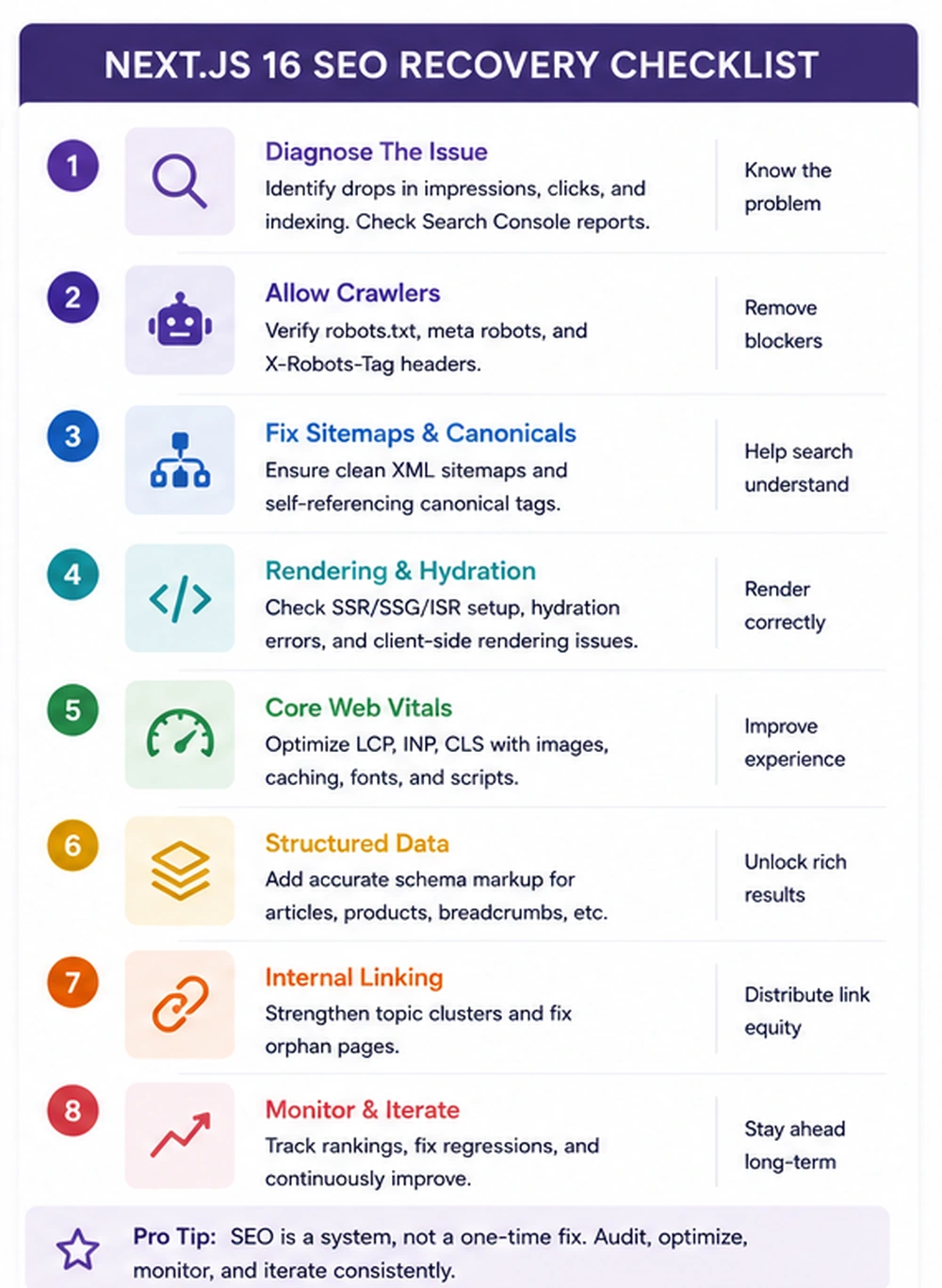
Create a route inventory. Identify top landing pages, top revenue pages, pages with declining impressions, pages stuck in indexing issues, and page templates with weak Core Web Vitals. Inspect raw HTML, rendered DOM, metadata, schema, internal links, canonical rules, and Search Console data.
Week 2: Fix route fundamentals
Prioritize the most valuable templates. Move critical content server-side. Define route-level metadata. Add canonical rules. Ensure indexable pages have meaningful headings, body copy, schema, and internal links in the initial HTML.
Week 3: Improve performance
Reduce unnecessary client JavaScript. Optimize images and fonts. Control third-party scripts. Review caching. Fix layout shift. Measure improvements on real pages, not only lab tests.
Week 4: Validate and monitor
Submit key pages for inspection. Watch indexing, impressions, clicks, Core Web Vitals, crawl behavior, and conversions. Document which changes were shipped. Add checks to prevent regression in future releases.
What business leaders should ask the team
If you are not the developer, you can still ask useful questions. Which public routes are server-rendered or statically generated? Does the initial HTML contain the page's main content? Are titles, descriptions, canonicals, and schema generated server-side? Which pages are discovered but not indexed? Which templates have poor Core Web Vitals? Are important links visible as crawlable anchors? Do filters and query parameters create duplicate URLs? Are product or service pages using accurate structured data? How do we prevent metadata or rendering regressions during releases?
A team that can answer these questions is likely managing the platform deliberately. A team that cannot answer them may be relying on hope.
Editorial conclusion
React SEO recovery is not about blaming JavaScript. It is about aligning the technology stack with the business role of each page. React is excellent for modern interfaces. Next.js is powerful for production web applications. But public pages that need search traffic must be designed as discoverable, structured, fast documents before they become interactive experiences.
The practical path is clear: audit what the server sends, choose the right rendering strategy for each route, centralize metadata, generate accurate schema, expose crawlable links, improve Core Web Vitals, and monitor changes after each release.
For SaaS, ecommerce, and B2B companies, this work can turn a polished but underperforming React website into a search-ready growth asset. The companies that win will not be the ones with the fanciest front end. They will be the ones whose architecture helps users, crawlers, AI systems, and buyers understand the page quickly and confidently.
Need this advice turned into a real delivery plan?
We can review your current stack, pressure-test the tradeoffs in this guide and turn it into a scoped implementation plan for your team.