Cuibit publishes insights from shipped delivery work across web, WordPress, AI and mobile. Articles are written for real buying and implementation decisions, then updated as the stack or the advice changes.
Cuibit Web Engineering
Web architecture and technical SEO team
The Cuibit team covering web architecture, Next.js delivery, technical SEO and buyer-facing product surfaces.
Key takeaways
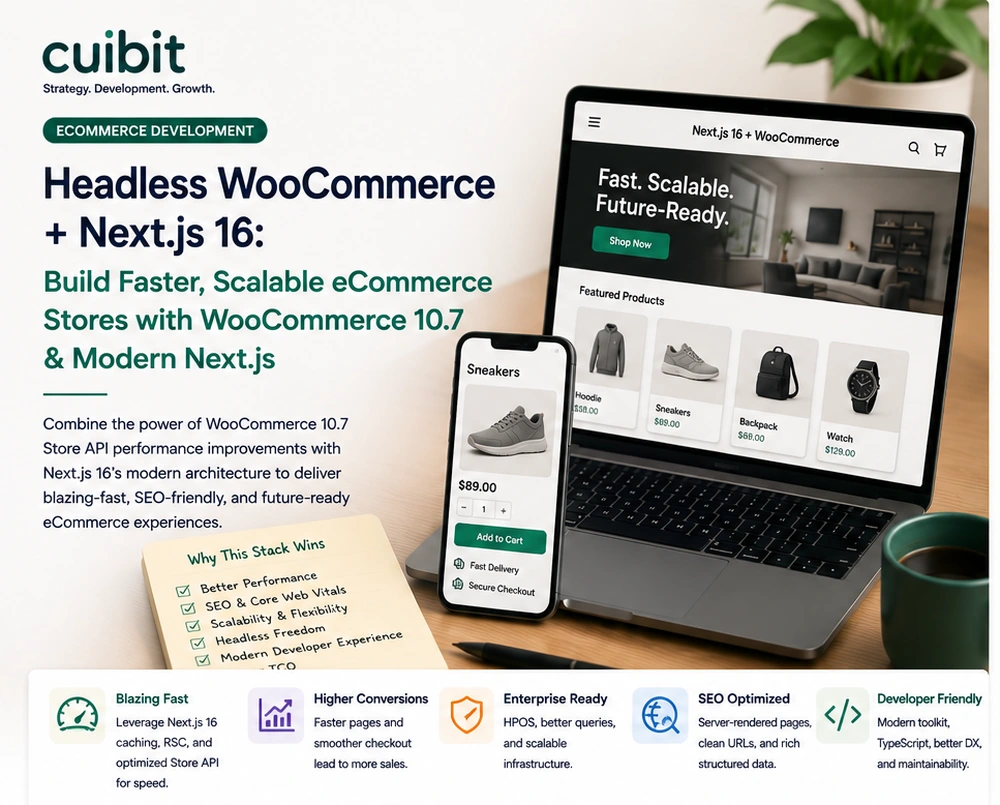
- Headless WooCommerce is not just a redesign choice. It is an architecture decision that affects catalog performance, checkout reliability, search visibility, analytics, developer workflow, and long-term maintenance.
- WooCommerce 10.8 is in beta testing with a final release scheduled for May 19, 2026, while WooCommerce 10.7 recently shipped performance, analytics, security, database, and Store API-related updates. That makes now a practical time to review ecommerce architecture rather than wait for the next urgent store issue.
- Next.js 16 can be a strong storefront layer for WooCommerce when the team uses server-first rendering, route-level caching, product schema, clean URLs, reliable cart state, and a checkout handoff that does not damage conversion.
- The best candidates for headless WooCommerce are stores with performance bottlenecks, complex content needs, custom product discovery, international storefronts, high-value SEO pages, or a roadmap that requires a better frontend experience than the current theme can support.
- The wrong candidates are stores that only need a simple catalog, have a limited budget, rely heavily on plugin-rendered frontend behavior, or lack a team that can maintain API-driven architecture.
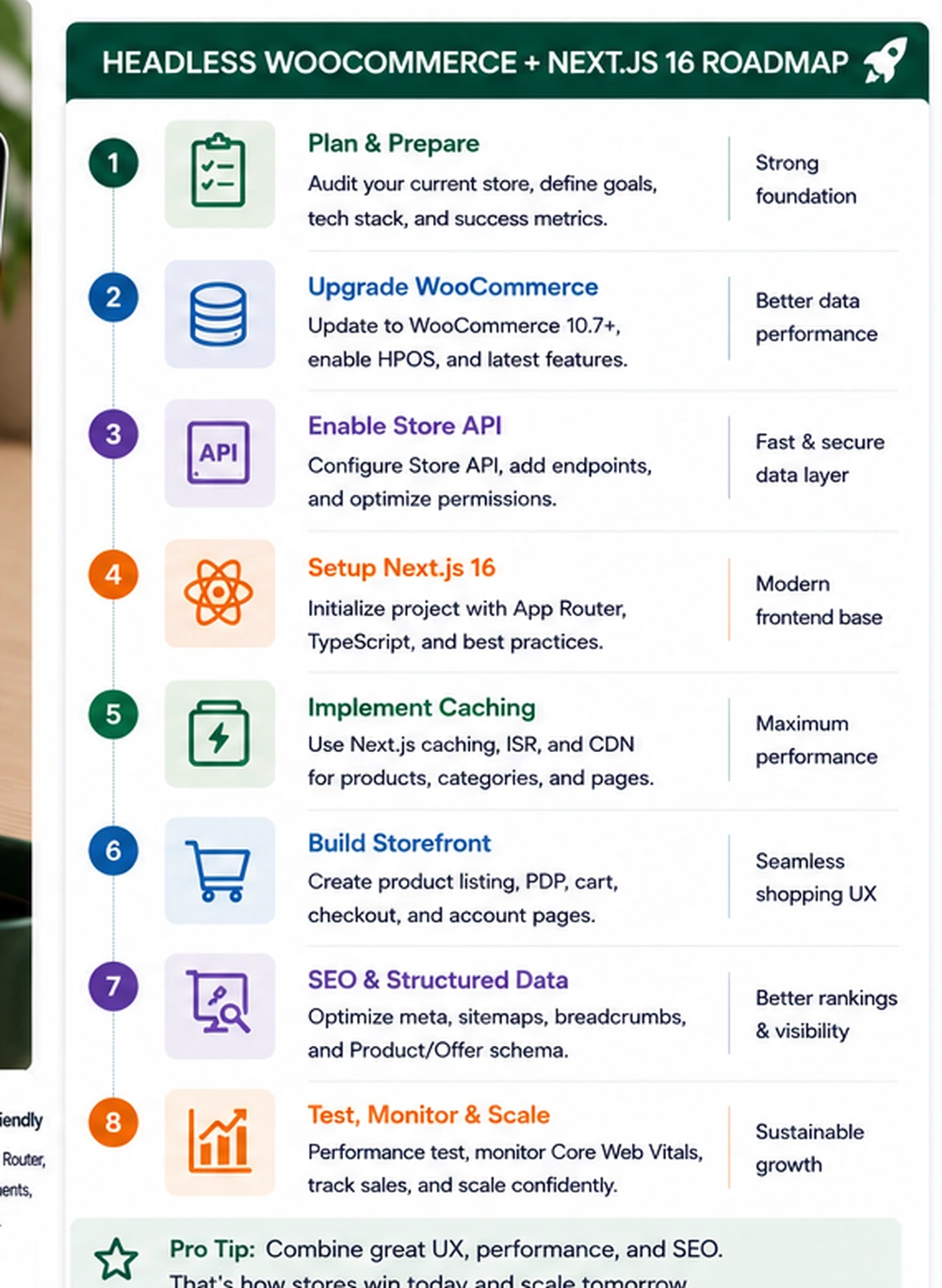
- A safe implementation starts with a store audit, route map, Store API and REST API boundary, cache plan, checkout strategy, analytics plan, SEO model, staging environment, and rollback process.
Why this topic matters now
WooCommerce remains one of the most flexible ecommerce platforms for businesses that want ownership, WordPress content control, and custom buying flows. But flexibility has a cost. As stores grow, many teams run into familiar problems: slow category pages, heavy product templates, fragile plugin stacks, complex checkout rules, poor Core Web Vitals, inconsistent product schema, and theme code that becomes harder to maintain each year.
At the same time, modern ecommerce buyers expect faster pages, smoother mobile experiences, clear product discovery, accurate stock information, and checkout flows that feel trustworthy. Search systems and AI-assisted discovery tools also need product pages that are crawlable, structured, and stable. A slow WooCommerce store is no longer only a technical inconvenience. It can reduce search visibility, paid traffic efficiency, conversion rate, and customer confidence.
This is why headless WooCommerce with Next.js 16 is a timely topic for Cuibit. WooCommerce’s developer changelog shows WooCommerce 10.8 beta is available for testing, with the final release scheduled for May 19, 2026, and WooCommerce 10.7 recently highlighted performance, analytics, security, database, and Store API improvements. Those updates reinforce the larger direction: WooCommerce stores are becoming more API-aware, block-based, performance-sensitive, and developer-driven. For businesses considering a rebuild, the question is not “Should we go headless because it sounds modern?” The question is “Would a headless storefront solve a real business and operational problem?”
Cuibit works across WooCommerce development, Next.js development, backend architecture, technical SEO, and performance optimization. A headless project touches all of those areas. This guide explains when the architecture makes sense, how to plan it, and what risks to control before development starts.
What headless WooCommerce actually means
A normal WooCommerce store uses WordPress and WooCommerce for both backend management and frontend rendering. Products, categories, cart templates, checkout pages, theme files, plugin outputs, blog content, and account pages all live inside the WordPress/WooCommerce frontend experience.
A headless WooCommerce store separates the frontend from the backend. WordPress and WooCommerce still manage products, orders, content, inventory, customers, coupons, and admin workflows. A separate frontend, often built with Next.js, displays the catalog, product pages, category pages, landing pages, blog content, cart experience, and sometimes parts of checkout. Data moves through APIs such as the WooCommerce Store API, REST API, WordPress REST API, GraphQL if used, or custom endpoints.
This separation gives teams more frontend freedom. They can build a faster product discovery experience, more flexible content sections, custom landing pages, modern search and filtering, better mobile interfaces, and server-rendered pages optimized for SEO. It can also reduce the public attack surface of the theme layer and make deployment workflows more controlled.
But headless is not simpler by default. It adds another application, another deployment pipeline, API boundaries, cache invalidation, frontend state management, monitoring, and additional integration work. The business must understand both sides: the WooCommerce backend and the Next.js storefront.
When headless WooCommerce is worth considering
Headless architecture is worth considering when the current frontend is limiting the business.
The store is slow despite normal optimization
If a WooCommerce store remains slow after image optimization, caching, hosting improvements, plugin cleanup, database maintenance, and theme review, the frontend architecture may be part of the bottleneck. A Next.js storefront can reduce frontend payload, use static generation or incremental regeneration, improve image delivery, and make category/product routes more predictable.
That said, headless is not a shortcut around a messy backend. If product data, hosting, database queries, checkout plugins, and third-party scripts are broken, moving the frontend will not fix everything.
SEO pages need stronger control
Large ecommerce sites often need better control over category pages, product pages, filters, breadcrumbs, schema, editorial content, and internal links. A headless storefront can give teams precise templates for high-value pages while still using WooCommerce as the product system.
This matters for organic traffic. A category page should not be only a product grid. It should explain how to choose, expose crawlable product links, show useful filters, include structured data where appropriate, and load quickly on mobile.
The store needs a custom buying experience
Some stores need workflows that normal WooCommerce themes struggle with: B2B pricing, quoting, bundles, subscriptions, complex product configurators, regional catalogs, customer-specific catalogs, guided selling, or multi-step product selection. Headless architecture can support these experiences when the backend rules are clearly modeled.
Content and commerce need to work together
Many brands need rich editorial content, landing pages, buying guides, comparison pages, and product education. WordPress is strong for content. Next.js is strong for custom frontend delivery. Headless WooCommerce can let the business keep WordPress content management while improving frontend performance and layout flexibility.
The team has engineering support
This is the most practical requirement. A headless store needs ongoing development support. If the business has no technical partner and wants a store that can be managed only through plugins, headless may be too complex. A well-built WooCommerce theme or performance rebuild may be the better choice.
When headless WooCommerce is the wrong move
Headless is not always the answer.
It may be the wrong move when the store is small, simple, and already performs well. It may also be wrong when most frontend functionality depends on plugins that inject templates, scripts, widgets, and checkout behavior directly into WordPress. Those plugin features may not automatically work in a separate Next.js storefront.
It may be wrong if the business expects a lower maintenance burden. Headless can reduce some problems, but it creates new ones: API monitoring, frontend deployments, cache invalidation, cart state, product synchronization, analytics mapping, and error handling.
It may be wrong if the store cannot define its requirements. A vague goal such as “make it modern” is not enough. The business should know what it wants to improve: page speed, category SEO, mobile conversion, product discovery, B2B buying, internationalization, editorial flexibility, or developer velocity.
The safest decision is to compare three options: optimize the current WooCommerce frontend, rebuild the WooCommerce theme, or build a headless Next.js storefront. Each has different cost, risk, maintenance, and upside.
The architecture: what connects to what
A headless WooCommerce architecture usually has several layers.
WordPress and WooCommerce backend
This remains the source of truth for products, categories, prices, inventory, orders, customers, coupons, tax settings, shipping settings, content, and admin operations. Store managers continue using the WordPress dashboard.
The backend must be clean. Product attributes should be structured. Categories should be logical. Stock and price rules should be reliable. Custom fields should be documented. If the backend data is messy, the frontend will only display that mess faster.
API layer
The frontend needs reliable data access. The Store API is useful for cart and checkout-related interactions in WooCommerce’s modern architecture. The WooCommerce REST API can support product, order, and admin workflows. WordPress APIs can expose posts, pages, media, menus, and custom content.
Some projects need custom endpoints to avoid over-fetching, expose business-specific data, or support complex queries. That is where backend development matters. The API layer should be secure, documented, cached carefully, and designed around the frontend’s real needs.
Next.js 16 storefront
Next.js handles routing, rendering, UI components, caching, images, metadata, structured data, and frontend application logic. Public pages such as homepage, category pages, product pages, content pages, and buying guides should be designed for fast rendering and search visibility.
Next.js 16 can support a route-by-route strategy. Some pages can be statically generated. Some can use incremental regeneration. Some can be server-rendered. Interactive cart features can run client-side where needed. The key is to avoid making every page client-heavy just because it is built in React.
Checkout strategy
Checkout is the highest-risk part of any headless WooCommerce project. Some teams keep WooCommerce checkout hosted in WordPress. Others build a custom checkout experience using APIs. The right choice depends on payment gateways, tax rules, shipping complexity, subscriptions, security requirements, and available engineering support.
For many businesses, the safest first version is a headless catalog and product discovery experience with a controlled checkout handoff. A fully custom checkout can come later if the business case is strong.
Analytics and tracking
A headless store can break analytics if tracking is not planned. Product impressions, add-to-cart events, checkout steps, purchases, refunds, coupon usage, and customer journeys must be mapped carefully. Server-side and client-side events should agree.
Analytics is not a decoration. It is how the business knows whether the architecture improved revenue.
Technical SEO requirements for a headless store
Headless commerce can improve SEO, but only if the implementation is disciplined.
Every indexable page should have:
- unique title and meta description
- canonical URL
- clean URL structure
- product or breadcrumb schema where appropriate
- crawlable internal links
- server-rendered body content
- optimized images
- stable pagination or filtering rules
- XML sitemap inclusion
- robots control
- fast Core Web Vitals
- meaningful category copy
- accurate product data
- no accidental duplicate URL states
Product schema must match visible product data. Prices, availability, reviews, images, and variants should be accurate. Category pages should not create thousands of thin filter combinations. Product links should be available as anchors, not only as JavaScript events.
Cuibit has written about search visibility in the AI era because AI-assisted discovery still needs clear source pages. A headless store with clean schema and fast product pages is easier for search systems and AI systems to understand than a bloated store with inconsistent markup. For teams planning ecommerce search work, Cuibit’s AI search visibility audit guide is a useful companion.
Performance planning: where the gains come from
A headless WooCommerce storefront can improve performance in several ways.
First, the frontend can ship less unnecessary JavaScript. Many WooCommerce themes load scripts, styles, plugin assets, sliders, widgets, and legacy dependencies across too many pages. A custom Next.js storefront can load only what each route needs.
Second, product and category pages can use stronger caching. Static generation or incremental regeneration can serve many pages quickly while refreshing product data when needed. This is valuable for catalogs where product data changes but not every second.
Third, images can be optimized more carefully. Ecommerce stores are image-heavy. Next.js image handling, CDN strategy, responsive sizes, and modern formats can make a large difference.
Fourth, the frontend can be built around mobile conversion. The mobile product page, sticky add-to-cart behavior, filter UX, product media, and checkout handoff can be designed from scratch rather than constrained by a theme.
However, performance gains are not automatic. A headless store can still be slow if it over-fetches APIs, ships heavy client bundles, uses too many third-party scripts, handles cart state poorly, or invalidates cache too often. The architecture needs performance budgets from the start.
Store API and data boundary planning
The WooCommerce Store API is a key part of modern WooCommerce architecture, especially for cart and checkout interactions. In a headless project, the team needs to define what data comes from Store API, what comes from REST API, what comes from WordPress content APIs, and what requires custom endpoints.
A useful data boundary plan answers:
- Where do product listings come from?
- Where do product details come from?
- How are variations handled?
- How are prices and discounts displayed?
- How is cart state stored?
- How is stock checked?
- How are shipping methods calculated?
- How are taxes calculated?
- How are coupons applied?
- How is checkout completed?
- How are customer accounts handled?
- How are order confirmations displayed?
- How are product changes revalidated in the storefront cache?
These decisions should be documented before development. They affect security, performance, analytics, and support.
Checkout: the decision that deserves the most caution
Checkout is where ecommerce projects succeed or fail. A beautiful headless storefront is not useful if checkout becomes fragile.
There are three common patterns.
Pattern 1: Headless catalog with WooCommerce checkout
The Next.js frontend handles homepage, content, categories, product pages, search, and cart preview. Checkout redirects to the WooCommerce checkout page. This is often safer for the first version because payment gateways, tax plugins, shipping plugins, and order processing remain inside WooCommerce.
The downside is that the user experience may feel less unified, and performance gains may be limited at checkout.
Pattern 2: Headless cart with embedded checkout handoff
The storefront manages cart and product discovery, then hands off to WooCommerce at a later step. This can improve shopping UX while keeping sensitive checkout logic in WooCommerce.
Pattern 3: Fully custom headless checkout
The frontend handles the full checkout experience through APIs. This can produce the best user experience but requires careful engineering. Payment gateways, fraud checks, taxes, shipping, subscriptions, and compliance must all work correctly.
For most businesses, a phased approach is safer. Prove the catalog and product experience first. Then decide whether custom checkout is worth the added complexity.
Migration plan: from theme frontend to Next.js storefront
A safe migration should not start with design screens. It should start with a business and technical inventory.
Step 1: Audit the current store
Review traffic, revenue by page type, top products, top categories, Core Web Vitals, plugin stack, checkout flow, product data quality, schema, analytics, and technical SEO issues.
Step 2: Define the route map
List every route the new storefront needs: homepage, category, product, search, cart, checkout handoff, account links, content pages, buying guides, blog posts, comparison pages, and campaign landing pages.
Step 3: Decide rendering and caching
Choose static generation, incremental regeneration, server rendering, or client rendering by route. Define cache rules and revalidation triggers.
Step 4: Design the API contract
Document each data source, endpoint, authentication requirement, cache policy, and error state. Avoid building the frontend before the data contract is stable.
Step 5: Build and test the storefront
Develop templates, components, product cards, filters, PDPs, cart interactions, metadata, schema, and analytics events.
Step 6: Run SEO parity checks
Before launch, compare old and new URLs, metadata, canonical rules, structured data, redirects, sitemaps, breadcrumbs, internal links, and page content. A redesign that improves speed but loses URLs can still hurt organic traffic.
Step 7: Launch gradually where possible
For complex stores, consider launching a smaller route set first or using controlled traffic. Monitor errors, conversion, search crawling, checkout behavior, and customer support.
Cuibit’s B2B WooCommerce rebuild example is relevant because ecommerce projects often involve more than visual design. Pricing logic, catalog structure, performance, user roles, and checkout reliability are all part of the business system.
When to use headless for B2B ecommerce
B2B WooCommerce stores can be good candidates for headless architecture, but they require special planning.
B2B often includes:
- customer-specific pricing
- quote requests
- bulk ordering
- role-based catalogs
- purchase approvals
- invoice payments
- account managers
- custom shipping rules
- repeat order workflows
- private product data
These features must be modeled carefully. A headless frontend needs to know what each customer can see and buy. That means authentication, permissions, cache rules, and API responses must be designed together. Accidentally caching customer-specific prices in a public route would be a serious error.
For B2B stores, the safest route is usually a staged build with strong backend review and careful QA.
When to use headless for content-led ecommerce
Some brands sell through education. They rely on buying guides, comparison articles, use-case pages, landing pages, product education, and editorial campaigns. WordPress is excellent for that content layer. A headless storefront can combine WordPress content with WooCommerce products in a faster, more flexible frontend.
For example, a guide can include product recommendations, category links, comparison tables, FAQs, and schema while still being managed in WordPress. Next.js can render the page quickly and connect it to product data. This is powerful for SEO and conversion when the content is useful and the product data is accurate.
The risk is content model complexity. Editors should not have to call developers for every campaign. The CMS needs reusable blocks, product selectors, internal link controls, and preview workflows.
What business leaders should ask before approving headless WooCommerce
Before committing budget, ask:
- What specific business problem are we solving?
- Which pages are currently slow or underperforming?
- What traffic and revenue come from product and category pages?
- Which plugins affect checkout, pricing, shipping, tax, or inventory?
- Will checkout remain in WooCommerce or become headless?
- How will product data update in the storefront?
- How will cache invalidation work?
- How will schema and sitemaps be generated?
- How will analytics events be tracked?
- Who will maintain the Next.js application?
- What is the rollback plan?
- What is the expected improvement in speed, conversion, or SEO?
If the team cannot answer these questions, the project needs discovery before development.
How this connects to Cuibit services
A headless WooCommerce project requires more than one skill set. It needs WooCommerce knowledge, WordPress content modeling, API design, Next.js engineering, frontend UX, backend reliability, technical SEO, analytics, and maintenance planning.
Cuibit’s custom web development team can help design the application layer. The frontend development work defines the storefront experience. The backend development layer handles APIs, data boundaries, and integrations. The WordPress speed optimization work remains relevant because the WooCommerce backend still needs to be healthy.
This is also why headless projects should not be sold as a simple frontend redesign. They are ecommerce architecture projects.
Editorial conclusion
Headless WooCommerce with Next.js 16 can be a strong choice for stores that need faster product discovery, better category SEO, richer content-commerce experiences, and more control over the customer journey. But it is not automatically better than a well-built WooCommerce theme. The architecture is only worth it when it solves a real business problem and when the team can maintain the added complexity.
The right plan starts with an audit. Understand the current store, product data, plugin stack, checkout logic, performance, search visibility, and conversion paths. Then decide whether to optimize, rebuild the WooCommerce frontend, or go headless.
For serious ecommerce teams, the opportunity is clear: WooCommerce can remain the flexible backend, while Next.js becomes a fast, search-ready, mobile-first storefront. The companies that win will be the ones that treat this as a business system, not a trend.
Need this advice turned into a real delivery plan?
We can review your current stack, pressure-test the tradeoffs in this guide and turn it into a scoped implementation plan for your team.