Cuibit publishes insights from shipped delivery work across web, WordPress, AI and mobile. Articles are written for real buying and implementation decisions, then updated as the stack or the advice changes.
Cuibit WordPress Performance
WordPress and WooCommerce delivery team
The Cuibit team focused on custom WordPress builds, WooCommerce systems, Core Web Vitals and long-term maintainability.
Key takeaways
- WooCommerce is moving from a traditional ecommerce plugin into a more agent-ready commerce layer, with MCP support, canonical product and order abilities, and AI workflows that can review live store data.
- Google’s I/O 2026 announcements around AI Mode, Universal Cart, and agentic shopping make ecommerce data quality more important. Stores need clean product data, fast templates, structured content, and reliable checkout operations before AI assistants can help meaningfully.
- WooCommerce performance is now part of AI commerce readiness. Slow product pages, unstable filters, plugin bloat, weak Core Web Vitals, and inconsistent schema make a store harder for customers, crawlers, and AI systems to trust.
- The practical response is not to install one more AI plugin. Businesses should audit hosting, plugin governance, product data, Store API behavior, order workflows, checkout stability, analytics, and support documentation.
- A safe AI automation roadmap starts with read-only insights, merchant dashboards, and internal support workflows before exposing customer-facing AI actions.
- Cuibit recommends treating this as a combined WooCommerce development, performance, and AI automation project rather than a cosmetic feature update.
Why this topic matters now
WooCommerce has always been valuable because it gives businesses ownership and flexibility. It lets teams combine WordPress content, custom product logic, payment workflows, subscriptions, memberships, B2B catalogs, and editorial SEO in one open ecosystem. That flexibility remains a major advantage. But the way ecommerce software is being used is changing quickly.
The same week that Google pushed deeper into AI Mode and agentic shopping, WooCommerce’s developer ecosystem highlighted MCP support, canonical product and order abilities, and Claude workflows that can turn live store data into guided reviews of revenue, products, customers, refunds, channels, payments, shipping, tax, and catalog health. These are not small interface changes. They point toward a future where ecommerce operations become more queryable, automatable, and connected to AI assistants.
For business owners, that sounds exciting. For engineering teams, it raises harder questions. Is the store data clean enough for an assistant to use? Are product names, variations, categories, and attributes consistent? Are order states reliable? Does the store run fast enough for customers and crawlers? Are plugins exposing too much logic in fragile ways? Are the right permissions in place? Can an AI workflow safely review refunds or shipping issues without making changes it should not make?
That is why this guide focuses on readiness, not hype. The winning WooCommerce stores in 2026 will not be the ones that install AI first. They will be the ones with clean data, fast templates, stable checkout, clear policies, and automation boundaries that make sense. For teams already investing in WordPress development, this is the moment to connect speed, data, and AI strategy.
What changed: WooCommerce is becoming more capability-driven
WooCommerce’s MCP direction is important because it gives AI clients a standardized way to interact with store capabilities. Instead of treating a store as a pile of REST endpoints, the newer direction exposes discoverable operations with authentication and permissions. WooCommerce’s canonical abilities for products and orders are designed as a stable capability layer that can support the WordPress Abilities API, MCP, admin tooling, CLI workflows, automation systems, and future agent surfaces.
That shift matters because ecommerce automation needs reliable contracts. If an assistant is going to review product data, analyze order health, or help a merchant understand refunds, it needs to know what operations are possible and where permissions start and stop. The store also needs consistent data. A capability layer cannot magically fix a messy catalog or broken checkout setup.
This is similar to what happened in technical SEO. Search engines became more capable, but weak sites did not automatically benefit. The sites that performed best were those with clean architecture, clear entities, useful content, structured data, and strong performance. AI-assisted commerce follows the same pattern. More capable agents reward better structured systems.
The business case: AI readiness starts with operational clarity
A WooCommerce store can be visually impressive and operationally weak. That weakness usually appears in places customers feel directly: slow product pages, delayed cart updates, confusing variation selectors, checkout friction, inconsistent inventory, weak search filters, or unclear return rules. AI automation magnifies those problems because agents depend on reliable inputs.
Imagine asking an AI assistant to identify underperforming products. If product categories are inconsistent, review data is split across plugins, analytics events are unreliable, and stock rules are unclear, the answer will be incomplete. Imagine asking an assistant to review refund patterns. If order statuses are not used consistently or refund reasons are stored in free-text notes, the insight will be weak. Imagine asking a customer-facing assistant about shipping. If product-level restrictions and shipping policies conflict, the assistant may mislead customers.
Operational clarity is the foundation. It includes naming conventions, product attributes, category structure, order-state governance, policy documentation, analytics integrity, and performance stability. Cuibit’s AI automation work starts from this foundation because automation without clean systems creates fragile outcomes.
Step 1: audit product data before adding AI
Product data is the first readiness layer. Before connecting a store to AI workflows, review the catalog like an operations system.
Start with product titles. They should be clear, consistent, and descriptive without becoming keyword-stuffed. Product categories should reflect how customers shop, not only how the team thinks internally. Attributes should be normalized. If one product uses “navy,” another uses “blue,” and a third uses “midnight,” filters and recommendations become less reliable. Variations should be logical, especially for size, color, quantity, bundles, subscriptions, and compatibility.
Review image alt text, short descriptions, long descriptions, stock status, shipping dimensions, GTINs where relevant, brand fields, reviews, frequently asked questions, and product schema. If product data is weak, AI assistants will struggle to summarize, compare, and recommend correctly. The same cleanup improves search, category pages, internal search, product feeds, and conversion.
This work is not glamorous, but it creates compounding value. A clean catalog improves human browsing today and agentic commerce tomorrow.
Step 2: fix performance where customers and crawlers feel it
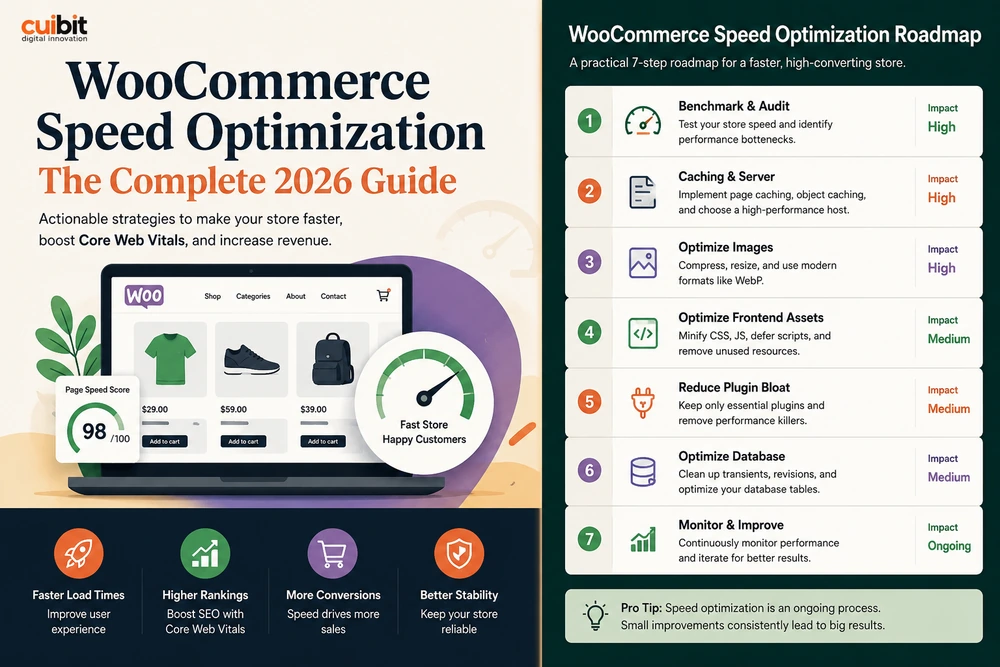
WooCommerce speed optimization is now part of AI readiness. Google’s AI Mode and agentic shopping experiences increase the need for stores that load quickly, expose clear information, and avoid technical confusion. A slow store can still be indexed, but every delay creates friction for customers and signals operational weakness to search systems.
Audit templates, not just the homepage. The key templates are product detail pages, category pages, filtered results, search pages, cart, checkout, account pages, and top buying guides. For each one, review Largest Contentful Paint, Interaction to Next Paint, Cumulative Layout Shift, server response, JavaScript weight, image weight, third-party scripts, and plugin output.
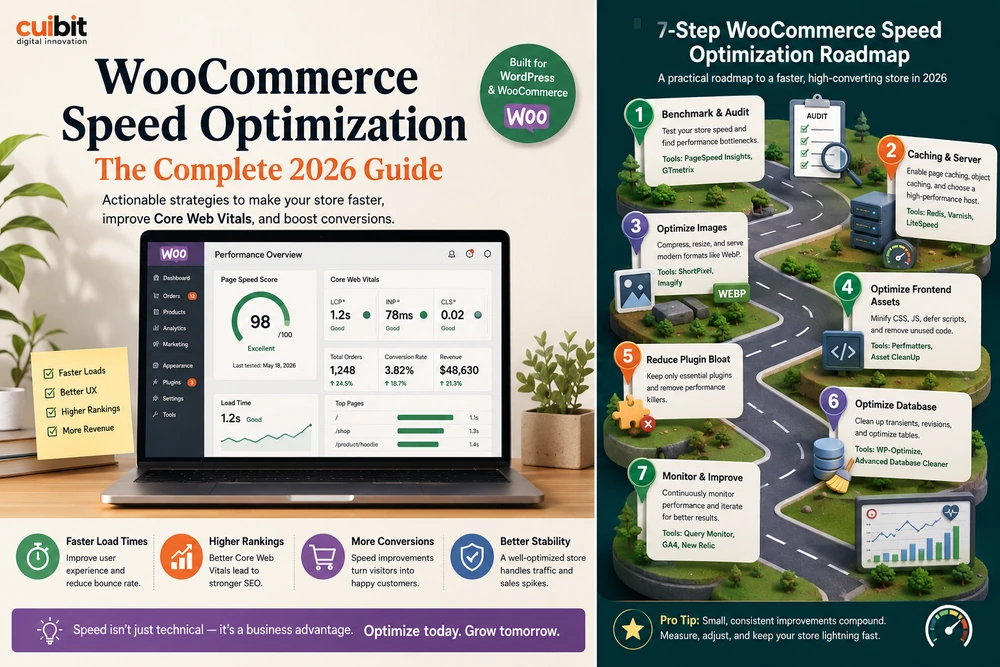
The biggest causes of WooCommerce slowdown are familiar: weak hosting, no persistent object cache, oversized images, too many frontend scripts, heavy page-builder sections, duplicated tracking, poor database cleanup, and plugins loading assets everywhere. A performance project should prioritize what affects revenue. Product image loading, variation selection, filter responsiveness, cart updates, and checkout stability matter more than a decorative homepage animation.
Cuibit’s WordPress speed optimization work usually combines frontend cleanup, backend tuning, caching rules, image workflows, plugin review, and Core Web Vitals monitoring. For WooCommerce, that full-stack view matters because the store is dynamic.
Step 3: review MCP and permissions carefully
AI integrations should be permissioned deliberately. MCP support can make WooCommerce more useful to AI clients, but every capability should be evaluated for risk. Reading product data is different from editing products. Reviewing order analytics is different from changing order status. Summarizing refunds is different from issuing refunds.
A safe rollout should begin with read-only use cases. Let AI assistants help merchants understand product gaps, summarize sales issues, identify catalog problems, inspect shipping patterns, or review customer support categories. Once the team trusts the workflow and understands audit requirements, move toward controlled actions.
Use role-based permissions, logging, approval steps, and environment separation. Staging should be available for testing agent behavior before production. Sensitive operations should require human approval. The goal is not to prevent automation. The goal is to introduce automation without giving a tool more authority than the business can safely monitor.
Step 4: connect store knowledge with RAG, not generic AI answers
A generic AI assistant can write fluent answers, but ecommerce requires accuracy. Customers asking about sizing, delivery, returns, subscriptions, compatibility, warranty, or order status need grounded information. Internal teams reviewing revenue, refunds, product quality, or customer issues need the same.
That is where RAG development becomes useful. Retrieval-augmented generation lets an AI workflow reference approved store knowledge, such as product manuals, policy pages, size guides, support macros, shipping rules, refund terms, and internal operating documents. The assistant can answer from controlled sources instead of guessing.
For WooCommerce, a practical RAG system might index product documentation, policy pages, category guides, support articles, and selected operational reports. It should include source references, freshness checks, and review workflows. The system should not invent shipping rules or make unsupported claims about products.
RAG does not replace store cleanup. It depends on store cleanup. If source content is outdated, contradictory, or thin, retrieval only surfaces the weakness faster.
Step 5: make analytics and order workflows trustworthy
AI workflows are only as useful as the data they inspect. Many WooCommerce stores have analytics problems caused by plugin overlap, duplicate tracking pixels, missing events, checkout redirects, cookie consent misconfiguration, or changes made by different vendors over time. Before relying on AI-assisted reports, verify the data layer.
Review conversion events, add-to-cart events, product views, checkout steps, refunds, coupon usage, subscription renewals, and customer account behavior. Make sure revenue numbers in analytics, payment gateways, WooCommerce reports, and ad platforms are directionally consistent. Perfect attribution is difficult, but broken attribution is dangerous.
Order workflows need similar review. Standardize order statuses. Document refund reasons. Confirm shipping and tax rules. Check scheduled actions. Review failed payment handling. Inspect email deliverability. If an AI workflow is going to identify operational problems, it needs reliable operational records.
Step 6: reduce plugin risk before automation expands
WooCommerce stores often grow through plugins. That is normal. The risk appears when no one owns the plugin stack. A store may have separate extensions for reviews, subscriptions, filters, product options, payments, shipping, tax, analytics, popups, loyalty, custom fields, and feeds. Some are critical. Some are outdated. Some duplicate work.
Create a plugin register. For each plugin, record its purpose, owner, renewal cost, pages affected, scripts loaded, data created, compatibility status, and replacement options. Then classify plugins as essential, replaceable, redundant, risky, or legacy.
This reduces both performance risk and automation risk. AI agents or MCP tools interacting with store data need a predictable environment. If the store has ten plugins changing product data, checkout behavior, and order status in different ways, automation becomes harder to trust.
For long-term stores, ongoing WordPress maintenance support should include plugin governance, staging tests, release notes, backup checks, security reviews, and performance monitoring.
Step 7: prepare checkout before customer-facing AI actions
Customer-facing AI actions should not touch checkout until the checkout system is stable. That means product variation logic, cart behavior, coupon handling, shipping calculation, taxes, payment methods, fraud checks, account creation, email confirmation, and order status transitions must all be tested.
Agentic commerce makes checkout reliability even more important. If an assistant helps a customer build a cart or understand a return policy, the store must deliver a consistent experience. Confusing fees, late shipping surprises, broken coupons, or slow payment redirects damage trust.
Start with guidance, not transactions. Let AI help customers compare products, understand policies, or find relevant guides. Move toward transactional assistance only when the business has a clear approval, logging, security, and support process.
Step 8: connect WooCommerce to broader business systems carefully
Many ecommerce businesses eventually need integrations with ERP, CRM, inventory, fulfillment, customer support, email, SMS, accounting, and analytics platforms. AI workflows can make these connections more valuable, but they also increase risk. A bad integration can create incorrect stock levels, duplicate customers, wrong tax behavior, or failed fulfillment.
Before adding AI layers, map system ownership. Which system owns product data? Which owns inventory? Which owns customer support tickets? Which owns refunds? Which owns marketing consent? Which owns fulfillment status? Automation should follow those boundaries instead of blurring them.
Cuibit’s backend development team often handles this layer because reliable ecommerce automation depends on stable APIs, queues, logging, retries, and error handling. AI does not remove backend engineering. It raises the value of good backend engineering.
What a 30-day readiness sprint should include
A realistic WooCommerce AI readiness sprint should not try to rebuild everything. It should identify risk and produce a clear roadmap.
Week one should focus on discovery. Audit hosting, plugin stack, product data, order workflows, analytics, checkout, MCP status, security, and performance. Week two should focus on quick technical fixes: caching, images, plugin cleanup, script governance, and obvious data inconsistencies. Week three should focus on knowledge architecture: policy documents, product guides, support macros, schema, FAQs, and internal workflow documentation. Week four should focus on AI use-case design: read-only dashboards, merchant insights, support assistance, RAG prototype, permissions, and monitoring.
The deliverable should be practical: what to fix now, what to automate later, what not to automate, and what requires custom development. The sprint should also assign clear owners for product data, performance, checkout, analytics, and AI permissions so the improvements do not disappear after launch.
When custom development makes sense
Custom development makes sense when plugin stacking creates too much risk or when the store needs a workflow that standard tools cannot model cleanly. Examples include B2B pricing, advanced product builders, custom quotes, ERP-connected inventory, gated catalogs, complex refunds, custom subscription logic, or internal dashboards for store operations.
This is where WooCommerce remains powerful. It can be extended deeply, but serious extensions require engineering discipline. Custom code should be documented, tested, version-controlled, and designed around WordPress and WooCommerce conventions. It should not be scattered through theme files or random snippets.
For businesses expanding beyond the website, Cuibit can also connect ecommerce platforms to mobile apps, AI workflows, and custom web systems. The important part is designing the data model once, then exposing it safely across channels.
Editorial conclusion
WooCommerce is entering a more agent-ready era. MCP support, canonical product and order abilities, Claude workflows, Google AI Mode, and agentic commerce are all pointing toward the same future: ecommerce systems will be increasingly reviewed, queried, summarized, and assisted by AI.
That future does not reward messy stores. It rewards stores with clean product data, fast templates, reliable checkout, clear policies, structured knowledge, accurate analytics, and permissioned automation. The businesses that prepare now will not only be more AI-ready. They will also have better SEO, faster pages, stronger conversion paths, and more stable operations.
The practical next step is not to install every new AI tool. It is to audit the store like a business system. Fix the data. Improve speed. Document workflows. Review permissions. Then add AI where it reduces friction and improves decisions.
For WooCommerce businesses planning performance upgrades, AI-assisted store operations, or safer automation, Cuibit’s LLM integration services and ecommerce engineering teams can help turn the current trend into a maintainable system rather than another plugin experiment.
Need this advice turned into a real delivery plan?
We can review your current stack, pressure-test the tradeoffs in this guide and turn it into a scoped implementation plan for your team.