Cuibit publishes insights from shipped delivery work across web, WordPress, AI and mobile. Articles are written for real buying and implementation decisions, then updated as the stack or the advice changes.
Cuibit Mobile Engineering
Flutter and React Native delivery team
The Cuibit team covering cross-platform product delivery, mobile architecture, release operations and post-launch maintenance.
Key takeaways
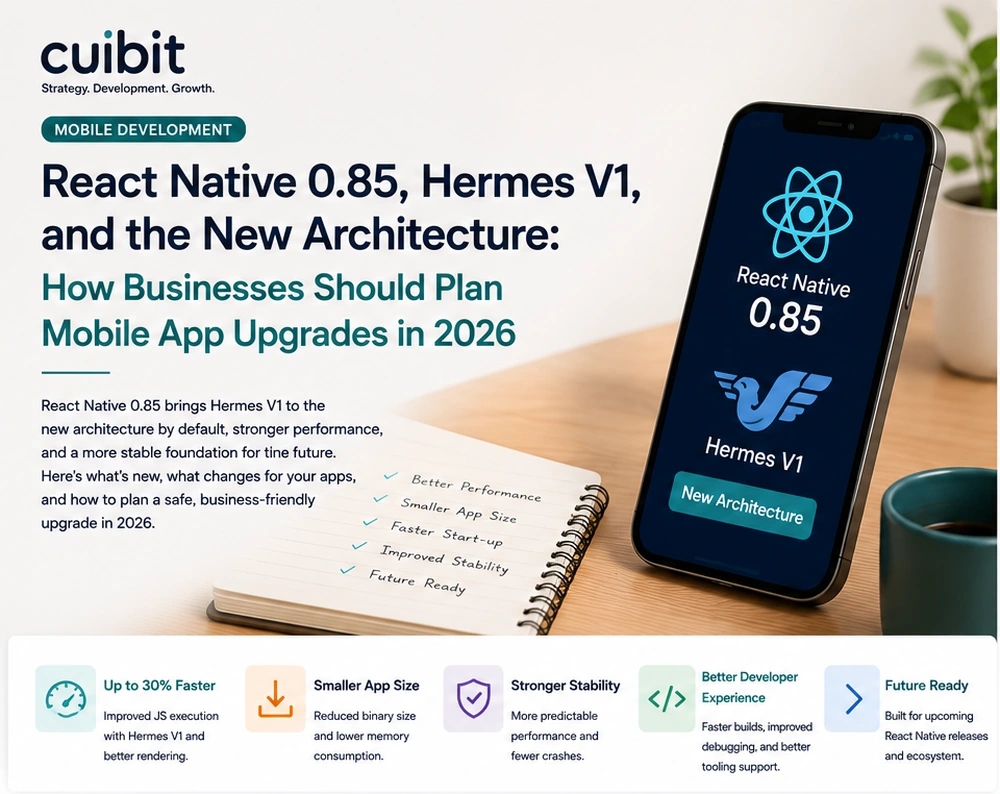
- React Native 0.85 is not just another mobile framework version bump. It builds on the 2026 platform shift toward Hermes V1, the New Architecture, improved animation behavior, updated testing tooling, and a more modern development baseline.
- Businesses with production mobile apps should not treat the upgrade as a same-day dependency change. The right plan includes dependency inventory, native module review, CI checks, real-device testing, performance baselines, crash monitoring, and a staged rollout.
- Hermes V1 becoming the default in React Native 0.84 matters for 0.85 planning because it changes the performance baseline for JavaScript execution, memory usage, startup behavior, and debugging expectations across iOS and Android.
- The New Architecture is now a practical planning requirement, not a future idea. Fabric, TurboModules, bridgeless behavior, and native module compatibility should be evaluated before a business commits to new feature work on an old foundation.
- Mobile teams should use the upgrade as a chance to fix technical debt: outdated libraries, slow screens, fragile native modules, untested navigation flows, weak crash reporting, and inconsistent release processes.
- The business outcome should be a faster, more stable, easier-to-maintain cross-platform app, not simply a higher version number in package.json.
Why this topic matters now
React Native has entered a more mature phase in 2026. The framework is no longer only a way to share UI code across iOS and Android. It is becoming a stronger platform for long-term mobile product engineering, with a more modern architecture, a faster JavaScript engine, better animation foundations, and a clearer release cadence.
React Native 0.84 made Hermes V1 the default JavaScript engine and continued the removal of Legacy Architecture components. React Native 0.85 followed with a new animation backend, a dedicated Jest preset package, and additional improvements that matter for teams maintaining production apps. Together, these changes create a clear signal for businesses: if your React Native app is still sitting on older architecture, older dependencies, weak tests, or fragile native modules, 2026 is the year to plan the upgrade properly.
This matters because mobile apps are not isolated codebases. A business app may include authentication, payments, push notifications, offline storage, analytics, maps, chat, camera access, subscriptions, native SDKs, device permissions, and backend APIs. An upgrade can improve performance and maintainability, but it can also expose hidden problems if the app has not been maintained carefully.
For Cuibit, this topic connects directly to mobile app development services, React Native app development, cross-platform app strategy, and long-term mobile product reliability. The goal is not to chase a release number. The goal is to move the app onto a stronger foundation without breaking the user experience or business operations.
What changed with React Native 0.85
React Native 0.85 introduced a new animation backend, moved the Jest preset into a dedicated package, and shipped a set of fixes and improvements across the framework. The new animation backend is especially important because animation quality affects perceived performance. Users often judge an app by how smooth it feels before they consciously evaluate feature depth.
The dedicated Jest preset package also matters for mature teams. Testing is often where older React Native projects fall behind. Apps may have manual QA, but not enough automated coverage. When the framework separates and modernizes testing packages, it is a reminder that upgrade planning should include test infrastructure, not only runtime behavior.
The bigger story is the sequence. React Native 0.82 began a new era around the New Architecture. React Native 0.84 made Hermes V1 the default. React Native 0.85 continues refining the app experience and developer workflow. A business looking at this timeline should see a platform that is settling into a more modern base. Apps that ignore that shift will collect technical debt.
Why Hermes V1 matters for business apps
Hermes has been the default engine for React Native for years, but Hermes V1 represents a new step for performance and runtime behavior. In React Native 0.84, Hermes V1 became the default on iOS and Android. For most teams already using Hermes, the change does not require a new configuration switch. But it should still be tested.
The business benefits are straightforward:
- faster JavaScript execution
- lower memory usage
- improved startup performance
- better performance consistency across devices
- a stronger foundation for future React Native releases
Those benefits matter most for apps that run on a wide device range. A business app may feel fine on the latest flagship phone but slow on mid-range Android hardware used by field teams, customers, or emerging-market users. Hermes V1 can improve the baseline, but measurement is still required.
A serious upgrade plan should capture before-and-after numbers for app startup, key screen render times, memory usage, crash-free sessions, JavaScript errors, and user flows that already feel slow. Without measurement, the team may miss the benefit or overlook regressions.
The New Architecture is no longer optional planning
React Native's New Architecture changes how JavaScript and native layers communicate. It includes Fabric for rendering, TurboModules for native module access, and a shift away from older bridge assumptions. This is a major reason why the upgrade deserves business planning.
A simple app with current dependencies may move smoothly. A large business app with old native modules, custom SDKs, deep navigation flows, and platform-specific features may need more work.
The biggest risks usually sit in these areas:
- native modules that have not been updated
- old UI libraries
- animation libraries with architecture assumptions
- navigation stacks that depend on older behavior
- custom native code
- analytics and crash SDKs
- payment or subscription SDKs
- camera, location, Bluetooth, or file-system modules
- background tasks and push notifications
- offline storage and sync layers
This does not mean businesses should avoid the New Architecture. It means they should approach it like a migration, not a toggle.
If your organization is deciding between React Native, Flutter, and native development for a new product, Cuibit's Flutter vs React Native 2026 guide is a useful comparison. For existing React Native apps, the question is different: how do you modernize the foundation without disrupting users?
Which apps should upgrade first
Not every app needs the same timeline. Prioritize upgrades based on business risk and technical age.
Upgrade soon if the app is revenue-critical
If the app supports bookings, ecommerce, subscriptions, customer portals, internal operations, or field work, old dependencies are a business risk. The upgrade should be planned, tested, and scheduled.
Upgrade soon if the app is on an old React Native version
Apps several versions behind become harder to upgrade because breaking changes accumulate. A jump from an older release to 0.85 may require dependency, native module, build tooling, and test changes at the same time.
Upgrade soon if performance is already a complaint
Hermes V1 and the New Architecture may help, but they are not magic. Slow startup, janky transitions, heavy screens, and memory pressure should be measured before and after the upgrade.
Upgrade soon if the team is planning major new features
It is usually better to modernize the foundation before building large new modules. Adding features on top of an outdated app can make the eventual migration harder.
Wait briefly if key dependencies are not ready
If a mission-critical native module does not support the New Architecture or React Native 0.85 well, the business may need a mitigation plan. That might mean replacing the dependency, contributing a patch, or staging the upgrade in phases.
A practical upgrade roadmap
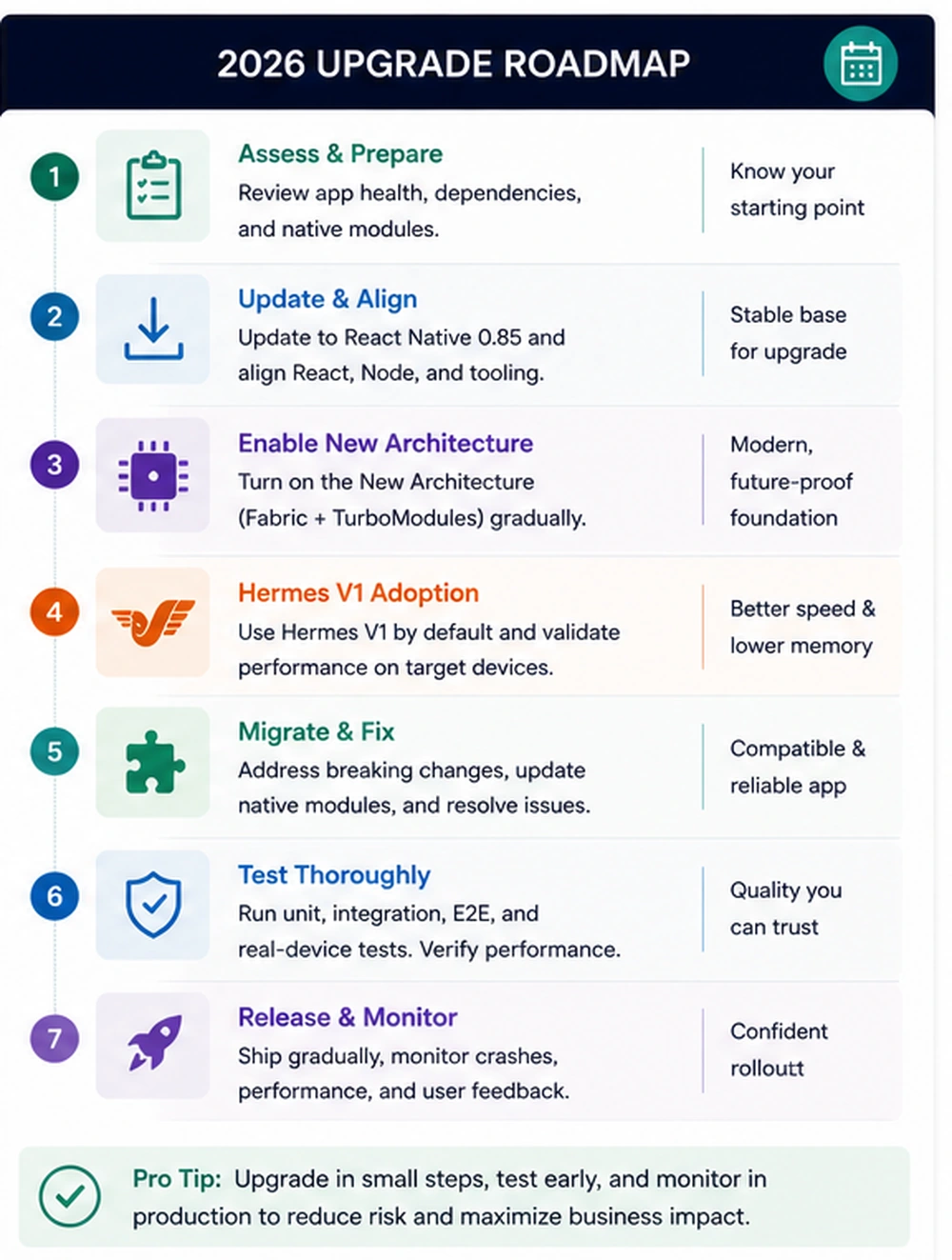
A safe mobile upgrade is a project. It does not need to be bloated, but it does need structure.
Step 1: Inventory the app
Document the current version of React Native, React, Hermes, Xcode, Android Gradle Plugin, Kotlin, Java, Node, CocoaPods, and major native modules. Also document push notifications, analytics, crash reporting, payment SDKs, authentication, deep links, background tasks, offline storage, and any custom native code.
This inventory helps the team see the actual migration surface. Many upgrade problems come from packages nobody remembered were critical.
Step 2: Establish a baseline
Before changing versions, measure:
- cold start time
- time to interactive
- memory usage
- app size
- crash-free sessions
- JavaScript error rate
- slow screen transitions
- API error rate
- battery or background behavior if relevant
- key user journey completion
The goal is to know whether the upgrade improves the app. A version number is not a result.
Step 3: Create an upgrade branch
Use a dedicated branch and keep the scope controlled. Update React Native, React, supporting dependencies, native project files, and testing packages in a clear sequence. Avoid combining the upgrade with unrelated feature work.
Step 4: Review New Architecture readiness
Check which libraries support Fabric, TurboModules, and bridgeless behavior. Review warnings, build output, native module documentation, and community issues. If a critical module is not ready, decide whether to replace, patch, or temporarily isolate it.
Step 5: Validate Hermes V1 behavior
Hermes V1 should be the default in modern React Native releases, but the team still needs to test real app behavior. Pay attention to startup, memory, debugging, crash reporting symbolication, stack traces, and performance on older devices.
Step 6: Update tests
React Native 0.85 moving the Jest preset into a dedicated package is a good moment to clean test setup. Update Jest configuration, mocks, React Native Testing Library behavior, native module mocks, and any snapshot tests that became brittle.
Step 7: Run real-device QA
Simulators are not enough. Test on real iOS and Android devices, including lower-memory Android devices if your customer base uses them. Test navigation, login, offline states, push notifications, forms, payments, file upload, camera, location, and deep links.
Step 8: Release gradually
Use staged rollout when possible. Monitor crashes, startup time, API errors, store reviews, support tickets, and analytics. A mobile upgrade should have a rollback or hotfix plan.
Common upgrade risks
Native module compatibility
Native modules are the usual source of pain. Even popular packages can lag behind framework changes. Before upgrading production, check every critical package.
Build pipeline issues
React Native upgrades can affect Xcode settings, Android Gradle configuration, Kotlin versions, Java versions, CocoaPods, Metro, and CI images. If your CI environment is old, the upgrade may fail before the app even runs.
Animation regressions
React Native 0.85's new animation backend is a positive change, but animation-heavy apps should test carefully. Onboarding flows, swipe gestures, charts, bottom sheets, and custom transitions need visual QA.
Crash reporting gaps
After upgrading Hermes and native binaries, confirm source maps, dSYMs, ProGuard or R8 mappings, and crash symbolication. A faster app is not enough if the team loses visibility into production errors.
App size surprises
Upgrades can change binary size. Measure app size before and after, especially if your users are sensitive to download size or storage.
Store release timing
Mobile releases depend on App Store and Google Play review cycles. Plan the upgrade window with release review, staged rollout, and hotfix timing in mind.
How this affects cross-platform app strategy
React Native is still a strong choice for many business apps. The New Architecture, Hermes V1, and continued tooling work improve the case for long-term React Native investment. But the framework is not a free shortcut. Teams still need mobile engineering discipline.
React Native works best when:
- the product needs strong cross-platform coverage
- the team values shared business logic and UI patterns
- native modules are well maintained
- the app does not rely on extremely specialized platform UI
- the team can maintain CI, testing, and native project files
- performance is measured on real devices
Flutter may still be a better fit in some cases, especially when a team wants a more controlled rendering model or has different internal skill sets. Native iOS and Android may be best for highly specialized platform experiences. The right decision depends on product goals, team skills, platform requirements, performance needs, and maintenance budget.
Cuibit's cross-platform app development work often starts with this tradeoff: choose the stack that the business can maintain, not the one that sounds most popular in a comparison chart.
What business leaders should ask their mobile team
A founder or product lead does not need to inspect every native module, but they should ask the right questions.
- What React Native version are we currently using?
- Are we already on Hermes, and have we confirmed Hermes V1 behavior?
- Are we using the New Architecture?
- Which native modules are business-critical?
- Which dependencies are blocking the upgrade?
- Do we have automated tests for key flows?
- Do we test on real devices before release?
- Do we measure startup time, memory, app size, and crash-free sessions?
- Can we release gradually?
- What is the rollback or hotfix plan?
- Who owns the mobile upgrade after launch?
If the team cannot answer these questions, the upgrade needs discovery before implementation.
What a good mobile upgrade partner should do
A good partner should not only update dependencies. They should understand the product, user flows, native integrations, and business risks.
A serious upgrade engagement should include:
- version and dependency audit
- native module compatibility review
- build pipeline review
- New Architecture readiness assessment
- Hermes V1 validation
- real-device QA plan
- crash reporting and analytics review
- performance baseline
- staged rollout plan
- post-release monitoring
- documentation for future upgrades
For teams without enough internal mobile capacity, Cuibit's hire React Native developers option can support upgrade planning, implementation, QA, and ongoing mobile development.
When to rebuild instead of upgrade
Sometimes upgrading the current app is the right move. Sometimes the app's foundation is too fragile.
Consider a rebuild if:
- the app is many versions behind
- native modules are abandoned
- navigation is unstable
- UI code is hard to maintain
- performance is poor across key screens
- test coverage is almost nonexistent
- the product has changed significantly
- backend APIs are being redesigned
- the app has repeated crash or release issues
A rebuild should still be carefully scoped. It should not be a vague rewrite. It should target specific business outcomes: faster performance, fewer crashes, cleaner architecture, better release process, easier feature delivery, and stronger analytics.
Cuibit's React Native monorepo work is relevant here because serious mobile products often need shared architecture, maintainable packages, testing discipline, and a release process that can support multiple teams.
How to budget the upgrade
The cost of a React Native 0.85 upgrade depends on the app's age and complexity.
A small app with current dependencies may only need a focused upgrade sprint. A larger app with native modules, payments, offline behavior, push notifications, and weak tests may need a multi-phase project.
Budget drivers include:
- current React Native version
- number of screens
- native module count
- custom native code
- authentication complexity
- payment or subscription flows
- offline storage
- device features
- CI/CD maturity
- QA requirements
- performance issues
- store release process
The cheapest upgrade is usually the one done regularly. The most expensive upgrade is the one delayed for years.
Editorial conclusion
React Native 0.85, Hermes V1, and the New Architecture mark an important point for business mobile apps. The framework has moved into a more modern foundation, and teams that keep up can benefit from better performance, smoother animations, stronger tooling, and a cleaner path for future releases.
But the upgrade is not a checkbox. It is a mobile product maintenance project. The safest plan starts with inventory, baselines, dependency review, New Architecture readiness, Hermes validation, test updates, real-device QA, staged rollout, and monitoring.
For businesses, the best question is not simply whether the app can run on React Native 0.85. The better question is whether the app is now easier to maintain, faster for users, more stable in production, and better prepared for the next two years of mobile product work.
That is the standard a serious upgrade should meet.
Need this advice turned into a real delivery plan?
We can review your current stack, pressure-test the tradeoffs in this guide and turn it into a scoped implementation plan for your team.