Cuibit publishes insights from shipped delivery work across web, WordPress, AI and mobile. Articles are written for real buying and implementation decisions, then updated as the stack or the advice changes.
Cuibit Web Engineering
Web architecture and technical SEO team
The Cuibit team covering web architecture, Next.js delivery, technical SEO and buyer-facing product surfaces.
Key takeaways
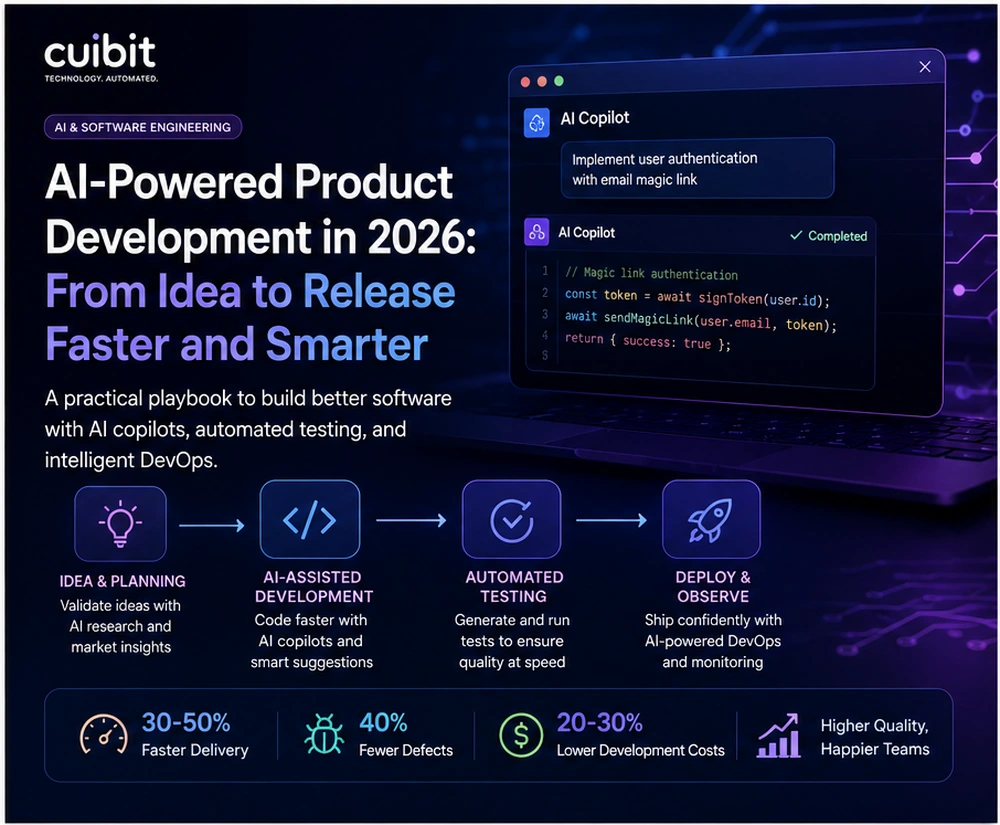
- AI-powered product development is moving from individual productivity hacks to an operating model for SaaS, ecommerce, and internal software teams. The value is not only faster code. It is faster learning, clearer planning, better testing, and more disciplined delivery.
- The strongest teams are using AI across the product lifecycle: market research, requirements, architecture options, frontend drafts, backend scaffolding, test generation, QA planning, release notes, observability, and post-launch analysis.
- Speed without governance creates risk. AI can produce plausible plans, code, and tests that still miss business context, edge cases, security expectations, accessibility, or maintainability.
- The right workflow keeps humans accountable for product judgment, architecture, security, customer impact, and final release decisions. AI should compress repetitive work and expand review coverage, not replace senior engineering judgment.
- SaaS teams should prioritize reusable product patterns, automated testing, CI/CD quality gates, analytics, and customer feedback loops. Ecommerce teams should prioritize catalog logic, checkout reliability, performance, structured product data, and conversion-impacting QA.
- A practical rollout starts with low-risk workflows: research summaries, user story drafts, UI prototypes, test generation, documentation, bug reproduction, internal tool improvements, and release checklists. Then it expands into deeper engineering work once quality controls are proven.
Why this topic matters now
AI adoption in software teams has shifted from experimentation to everyday operations. Product managers use AI to compare competitors and draft requirements. Designers use it to explore interface patterns. Developers use copilots and coding agents to produce first drafts, refactor code, generate tests, and investigate bugs. QA teams use AI to expand test coverage. Operations teams use it to summarize logs, build runbooks, and detect release risk.
The business opportunity is obvious: software teams can move faster. But the harder question is whether they can move faster without creating a mess. A product that ships quickly but creates brittle code, weak tests, unclear ownership, and poor customer experience is not actually faster. It simply moves the cost from development to maintenance.
That is why AI-powered product development needs a disciplined playbook. It is not enough to add a chatbot to the team and hope productivity improves. The company needs to decide where AI belongs in the product lifecycle, which outputs require review, how code quality is protected, how customer data is handled, and how the team measures value.
For Cuibit, this is directly connected to web development services, SaaS engineering, ecommerce rebuilds, AI automation, and product modernization. AI can accelerate delivery, but only when the website, application, and engineering process are designed to support clear requirements, maintainable code, reliable testing, and measurable outcomes.
What AI-powered product development actually means
AI-powered product development does not mean asking AI to build an entire product from a vague prompt. That approach usually creates demos, not durable software.
A better definition is this: AI-powered product development uses AI systems to assist each stage of the software lifecycle while keeping humans responsible for the product, architecture, quality, security, and release decisions.
That distinction matters. AI can help teams move from idea to release faster, but it cannot fully understand business context by default. It does not automatically know your customers, your compliance constraints, your infrastructure, your design system, your data model, or the long-term cost of a shortcut.
The practical use is workflow-level acceleration. AI can make the blank page less expensive. It can turn rough ideas into structured options. It can help teams compare approaches. It can draft code and tests. It can summarize tradeoffs. It can find inconsistencies. It can review logs and suggest likely causes. It can reduce the friction between thinking and building.
But the team still needs a product strategy, a technical architecture, a review process, and a release discipline. Without those foundations, AI simply produces more output for humans to clean up.
The new product workflow: seven stages where AI helps
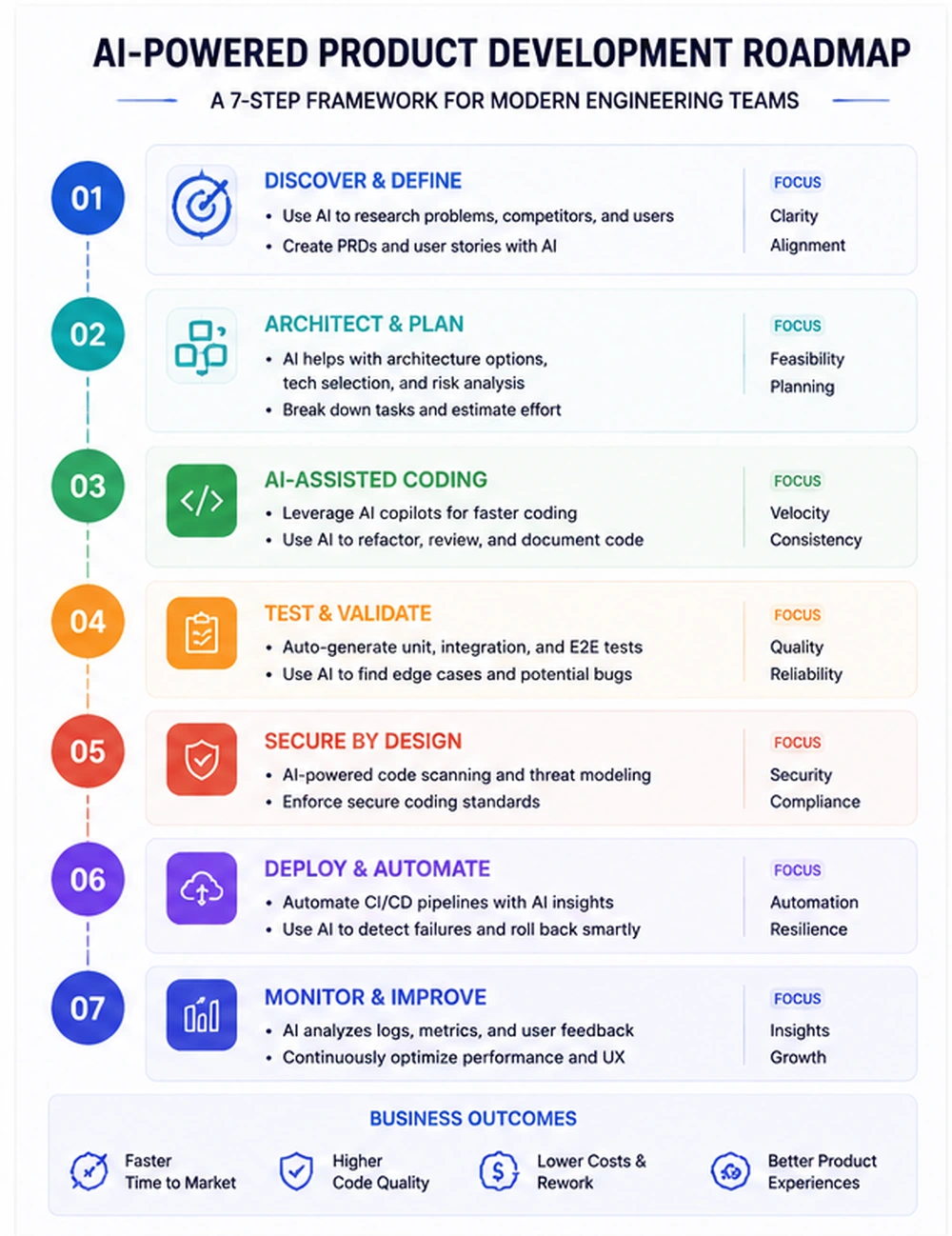
A mature AI-assisted workflow usually touches seven stages: discovery, planning, architecture, development, testing, release, and improvement.
1. Discovery and market research
AI can summarize public market information, competitor positioning, reviews, customer complaints, support tickets, sales call notes, and analytics exports. This helps product teams identify patterns faster.
The mistake is treating AI summaries as final truth. Research output should be checked against real customer conversations, product analytics, sales evidence, and support data. AI can shorten the path to insight, but it should not replace direct market contact.
Useful AI-assisted discovery tasks include:
- summarizing customer support themes
- clustering feature requests
- comparing competitor pricing pages
- identifying common objections in sales notes
- drafting interview questions
- turning analytics observations into hypotheses
- creating early problem statements
The output should feed a product brief. It should not become the product brief without human review.
2. Requirements and product planning
AI is useful for turning messy ideas into structured requirements. It can draft user stories, acceptance criteria, risk lists, dependency maps, and implementation questions.
This helps teams avoid the common problem of starting development with unclear scope. A vague ticket such as "improve dashboard filters" can become a clearer set of requirements: which filters matter, which roles use them, which data sources are involved, how empty states behave, what performance target is expected, and how success will be measured.
For a team building custom software through custom web development, this planning stage matters because bespoke products often fail when requirements are assumed rather than written. AI can help expose hidden questions early, before they become rework.
3. Architecture and technical planning
AI can compare implementation options, explain tradeoffs, create migration outlines, and draft architecture decision records. It can help teams think through frameworks, database choices, API patterns, caching, search, authentication, file storage, and deployment models.
However, architecture is one of the areas where human judgment matters most. AI may propose technically possible ideas that are wrong for the business. It may overbuild a simple feature or understate operational complexity.
Good teams use AI to generate options, not to make final architecture decisions. A senior engineer should still own the decision, document the reasoning, and define the constraints.
For example, a SaaS team choosing between a server-rendered marketing site, a client-heavy dashboard, and an API-first backend needs to understand SEO, performance, maintainability, authentication, deployment, analytics, and content operations. If the team is using Next.js development, AI can help draft route structures and component plans, but the final architecture must fit the product roadmap and technical constraints.
4. AI-assisted coding
Coding is the most visible AI use case, but it is not the whole story. AI can generate components, API handlers, form validation, data transformation functions, tests, scripts, and documentation.
The safest pattern is draft, test, review, improve. AI drafts the work. Automated tests catch obvious issues. Human review checks product fit, architecture, security, accessibility, and maintainability. Then the team improves the output.
AI-assisted coding works best when the repository is organized, patterns are clear, and the prompt includes constraints. It works poorly when the codebase is inconsistent, tests are missing, and tickets are vague.
For teams working with React development, AI can speed up component drafts, state handling examples, accessibility checks, and test scaffolds. But design system consistency, responsive behavior, and user experience still need careful review.
5. Testing and validation
AI can significantly improve testing coverage when used carefully. It can generate unit tests, integration tests, edge-case lists, regression checklists, and QA scenarios from user stories or bug reports.
This is often one of the best places to start because test output is easier to inspect than production logic. If AI proposes weak tests, the reviewer can improve them. If it identifies edge cases the team missed, the product becomes safer.
Good AI-assisted testing asks:
- What can fail?
- What inputs are unusual?
- Which permissions matter?
- What happens when data is missing?
- What happens on slow networks?
- What happens on mobile?
- What happens when the external API fails?
- Which customer workflows must never break?
For ecommerce sites, this includes checkout paths, coupon rules, tax logic, shipping conditions, inventory updates, product variations, account permissions, and order status changes. For SaaS dashboards, it includes roles, filters, exports, billing states, data freshness, notifications, and permissions.
6. Deployment and release management
AI can help prepare release notes, deployment checklists, rollback plans, monitoring queries, and incident response drafts. It can summarize pull requests and identify areas that need extra attention.
But deployment authority should remain controlled. AI should not push risky production changes without review. A mature release process includes CI checks, code owners, staging validation, feature flags where appropriate, monitoring, and rollback procedures.
Cuibit's backend reliability rebuild example is relevant because release speed only matters when the backend can handle change safely. Reliability, observability, and clean deployment practices are the foundation for AI-assisted delivery.
7. Post-launch learning
After release, AI can summarize analytics, user feedback, support tickets, error logs, session recordings, and sales notes. This helps teams learn whether the feature actually worked.
The best product teams close the loop. They do not stop at shipping. They inspect adoption, conversion, performance, bugs, and customer sentiment. AI can make that feedback loop faster by turning scattered data into structured questions for the next sprint.
The governance layer: how to keep AI useful and controlled
AI-powered product development needs a governance layer. That does not mean slowing every task with bureaucracy. It means defining the rules that let teams move quickly without creating hidden risk.
The governance layer should answer five questions.
What can AI access?
Decide which repositories, documents, tickets, analytics exports, and customer data can be used. Sensitive data should not be pasted into random tools. Secrets, credentials, personally identifiable information, payment data, and confidential customer records need clear handling rules.
What can AI change?
AI may be allowed to draft code, documentation, tests, or scripts. It may not be allowed to merge code, change protected files, update production infrastructure, or modify payment logic without approval.
The answer should vary by risk. A documentation update is different from an authentication change.
Who reviews AI output?
Every important AI-assisted output needs an owner. A product manager may own requirements. A designer may own UX decisions. A developer may own code. A senior engineer may own architecture. A QA lead may own test coverage. A business owner may own launch acceptance.
How is quality measured?
Track outcomes, not only activity. Useful metrics include cycle time, test coverage, escaped bugs, review comments, rollback rate, support tickets, conversion impact, performance changes, and developer satisfaction.
How does the workflow improve?
The team should keep improving prompts, templates, review checklists, and reusable patterns. AI adoption is not a one-time setup. It is an operating model that should mature over time.
Practical implementation plan for SaaS teams
SaaS teams should begin with the parts of the product lifecycle where context is clear and validation is possible.
Start with planning and requirements
Use AI to turn customer problems into clearer tickets. Ask it to identify missing requirements, edge cases, and risks. This helps product and engineering teams align before work starts.
Create reusable engineering patterns
AI performs better when it can follow existing patterns. Document component rules, API response formats, error handling, test style, naming conventions, and security expectations.
Use agents for tests and documentation first
Test generation and documentation updates provide early value without giving AI control over critical logic. Review the output, improve the templates, and create examples of acceptable work.
Expand into UI and internal tools
Once the team is comfortable, AI can help draft UI components, admin pages, reporting tools, and workflow screens. These tasks are valuable and usually easier to validate than deep platform logic.
Add backend work carefully
Backend work requires stronger controls. Authentication, authorization, billing, data deletion, integrations, and background jobs need senior review. Teams investing in backend development should treat AI as an assistant inside a controlled delivery process, not as an autonomous owner of business logic.
Connect AI to DevOps discipline
AI-assisted delivery should support CI/CD, not bypass it. Tests, linting, static analysis, preview environments, accessibility checks, and performance checks should remain mandatory.
Practical implementation plan for ecommerce teams
Ecommerce teams have different priorities because product data, checkout reliability, and conversion paths matter so much.
Use AI to clean catalog operations
AI can help identify inconsistent product descriptions, missing attributes, duplicate titles, weak category copy, and unclear product comparisons. This supports both search visibility and customer experience.
Improve product and category pages
AI can draft product FAQs, comparison tables, buying guide sections, and variant explanations. Human review is still needed to confirm accuracy, legal claims, shipping rules, and brand tone.
Strengthen checkout QA
Checkout is high risk. AI can help generate QA scenarios, but human testing remains essential. Test coupons, shipping zones, tax rules, guest checkout, account checkout, payment failures, abandoned carts, and mobile behavior.
Use AI for performance triage
AI can summarize performance reports and suggest likely causes, but developers need to confirm the fix. If a WordPress or WooCommerce site is slow, WordPress speed optimization may require theme cleanup, plugin reduction, image strategy, caching, database work, and hosting review.
Treat WooCommerce as a product system
For stores using WooCommerce development, AI can help with snippets, template drafts, testing plans, and catalog improvements. But pricing, inventory, checkout, customer roles, and order logic need careful engineering review.
Cuibit's B2B WooCommerce rebuild example is a good reminder that ecommerce engineering is not only page design. It includes catalog structure, performance, buying workflows, and operational reliability.
The tooling stack: what teams actually need
A useful AI-powered development stack usually includes more than one tool.
Product research and planning tools
These help summarize customer data, write briefs, compare competitors, draft requirements, and generate acceptance criteria. The output should be attached to the team's project management system so decisions are not lost in chat history.
Design and prototyping tools
AI can help explore layouts, rewrite microcopy, generate wireframe ideas, and test user flows. But final design still needs brand fit, accessibility, usability, and technical feasibility.
Coding assistants and agents
These help developers write code, understand existing files, draft pull requests, generate tests, and document changes. They should be connected to repository rules and review workflows.
QA and test tools
AI can expand test scenarios and detect gaps. The strongest setup combines AI-generated tests with existing automated test suites and human exploratory testing.
DevOps and observability tools
AI can summarize logs, detect anomalies, explain incidents, and help create runbooks. The team still needs reliable monitoring and clear ownership.
For companies building AI-enabled workflows beyond code, AI automation can connect product operations, internal tools, customer support, and reporting systems into more efficient processes.
When AI helps most and when it does not
AI helps most when the task has clear context, repeatable patterns, and verifiable outputs. It struggles when the task requires unresolved business judgment, sensitive tradeoffs, or deep understanding of undocumented systems.
Good AI-assisted tasks include:
- drafting product briefs from structured notes
- summarizing customer feedback
- generating test scenarios
- creating first-pass UI components
- writing documentation
- producing API examples
- refactoring small modules
- preparing release notes
- identifying missing edge cases
Riskier tasks include:
- changing authentication flows
- rewriting billing logic
- modifying payment processing
- designing data permission models
- changing production infrastructure
- making legal or compliance claims
- defining product strategy without customer evidence
The goal is not to avoid risk entirely. It is to match the AI role to the risk level.
How to measure AI-powered product development
Measurement should focus on business and engineering outcomes.
Track delivery speed, but do not stop there. A team can ship faster and still create worse software. Add quality and impact measures.
Useful metrics include:
- cycle time from idea to release
- number of accepted AI-assisted pull requests
- review comments per pull request
- test coverage added
- bug rate after release
- rollback rate
- page performance changes
- conversion changes
- customer support ticket volume
- time spent on rework
- developer satisfaction
- product manager satisfaction
- customer adoption of shipped features
For a SaaS dashboard, success might mean faster iteration, better activation, fewer bugs, and stronger customer retention. For an ecommerce store, success might mean faster merchandising updates, fewer checkout issues, better product page quality, and higher conversion.
Cuibit's custom React enterprise dashboard work shows why measurement matters. Complex dashboards need speed, but they also need data accuracy, permission clarity, performance, and user trust.
Common mistakes to avoid
Mistake 1: Replacing requirements with prompts
A prompt is not a product brief. If the team cannot explain the customer problem, success criteria, constraints, and tradeoffs, AI output will be shallow.
Mistake 2: Accepting AI code without review
AI can generate code that looks right but fails in edge cases. Review is still required.
Mistake 3: Skipping tests because AI wrote the code
AI-generated code needs tests as much as human-written code. In many cases, it needs more careful testing because the author did not experience the product context.
Mistake 4: Measuring only output volume
More tickets closed does not automatically mean better product development. Track rework, bugs, conversion, adoption, and customer value.
Mistake 5: Letting every team use different rules
Some flexibility is helpful, but the organization needs shared standards for data, security, review, and release.
Mistake 6: Ignoring content and SEO impact
AI-powered product development affects public-facing websites too. New pages, product features, and user flows need metadata, internal links, performance, accessibility, analytics, and search-friendly implementation.
A 30-day rollout plan
Week 1: Audit the product workflow
Review how ideas become requirements, how requirements become tickets, how tickets become code, how code is tested, and how releases are measured. Identify bottlenecks and low-risk AI opportunities.
Week 2: Create approved AI use cases
Choose five to eight use cases. Good candidates include customer feedback summaries, requirements drafts, test generation, documentation updates, bug reproduction, and release notes.
Week 3: Add review and quality gates
Create checklists for product review, code review, QA review, and release review. Decide which AI outputs require approval and which tools are approved.
Week 4: Measure and improve
Compare cycle time, review quality, tests added, bug trends, and team feedback. Keep what works. Remove what creates noise. Improve prompts and templates.
This 30-day plan does not make the company fully AI-powered. It creates a safe foundation. From there, teams can expand into deeper coding workflows, automated QA, internal tools, and release operations.
Editorial conclusion
AI-powered product development is not about handing the roadmap to a model. It is about making the product team sharper and the engineering system faster without giving up control.
The companies that benefit will not be the ones that produce the most AI-generated code. They will be the ones that use AI to improve clarity, reduce repetitive work, expand testing, strengthen documentation, and close the feedback loop between customer problems and shipped software.
For SaaS and ecommerce teams, the practical path is clear. Start with the workflow, not the tool. Define where AI can help. Keep humans accountable for judgment. Require tests and review. Measure quality and business impact. Improve the operating model every sprint.
Done well, AI becomes part of a better product development system: faster discovery, clearer requirements, safer implementation, stronger validation, and more useful releases.
Need this advice turned into a real delivery plan?
We can review your current stack, pressure-test the tradeoffs in this guide and turn it into a scoped implementation plan for your team.