Cuibit publishes insights from shipped delivery work across web, WordPress, AI and mobile. Articles are written for real buying and implementation decisions, then updated as the stack or the advice changes.
Cuibit AI Systems
Applied AI and LLM delivery team
The Cuibit team focused on production RAG, LLM integration, workflow automation, evaluation and model cost control.
Key takeaways
- AI chatbot development cost in 2026 is usually driven by system design, not just model access.
- RAG, integrations, and workflow automation move a project from “bot” pricing to product pricing.
- The cheapest chatbot option is often the most expensive one to fix later if it cannot connect to your real data, hand off to humans, or stay governed in production.
- Customer support, internal knowledge, and sales-assist bots have different cost profiles because their channel mix, integrations, and compliance needs are not the same.
- Businesses usually get better results when they scope around a high-volume workflow with clear data sources instead of trying to launch a vague all-purpose assistant.
If you want the direct answer first, here it is: AI chatbot development cost in 2026 can range from a few thousand dollars for a narrowly scoped assistant to well into six figures for a deeply integrated enterprise rollout. The spread is wide because companies are not buying the same thing. Some are buying a simple FAQ layer. Others are buying a production system with retrieval, permissions, analytics, CRM integrations, multilingual support, human handoff, and channel coverage across web, mobile, and support tools. That is why the better question is not “how much does a chatbot cost?” but what architecture do you need, what workflows should it handle, and what business risk are you trying to remove?
Why AI chatbot pricing looks different in 2026
A year ago, many chatbot conversations were still about models and demos. In 2026, serious buyers are much closer to an operational question: how do we build an assistant that actually works inside our business?
That shift matters because the market is clearly moving toward more integrated, agentic customer experience systems. Google Cloud and The Home Depot expanded their partnership around agentic AI tools earlier this year, and last week Google Cloud said Home Depot’s customer support voice agents were helping customers reach solutions faster while preserving a direct path to human associates. Microsoft also used its 2026 release wave to push further into voice agents, workflow automation, governance, and business system integration. Those signals matter because they show where buyer expectations are going: not generic chat windows, but AI systems tied to real operations.
For businesses planning a real rollout, the cost is no longer just about prompt design or interface polish. It is about data access, orchestration, channels, logging, evaluation, escalation rules, and ongoing tuning.
That is also why an AI chatbot development project should be scoped more like a product capability than a one-off feature.
What businesses are actually buying when they ask for a chatbot
The phrase “AI chatbot” hides a lot of variation. In practice, most projects fall into one of four buckets:
1. FAQ and lead-capture assistants
These are the lightest and cheapest projects. They answer repeat questions, qualify leads, collect contact details, and route conversations. They can work well for small businesses, service websites, or campaigns, but they are rarely enough for teams that want real knowledge retrieval or workflow execution.
2. RAG-powered support or knowledge bots
This is the category getting the most attention in 2026 because it is where businesses start to see practical value. A retrieval-based system can pull from documentation, product data, policy libraries, support content, or internal knowledge at runtime. That is why RAG development is often the most important line item in a serious assistant project.
3. Integrated workflow assistants
These go beyond answering questions. They create tickets, check order status, look up account data, summarize cases, trigger workflows, and escalate to human teams. This is where cost rises fast, because every useful integration introduces edge cases, security decisions, and testing requirements.
4. Enterprise or multi-channel AI assistants
These support more than one channel, more than one workflow, or more than one business unit. They may operate across website chat, support dashboards, mobile apps, internal knowledge tools, and CRM workflows. They often need governance, auditability, role-based access, analytics, multilingual support, and more controlled deployment pipelines.
The important takeaway is simple: most price confusion comes from comparing tools, prototypes, and production systems as if they are the same thing.
AI chatbot development cost ranges in 2026
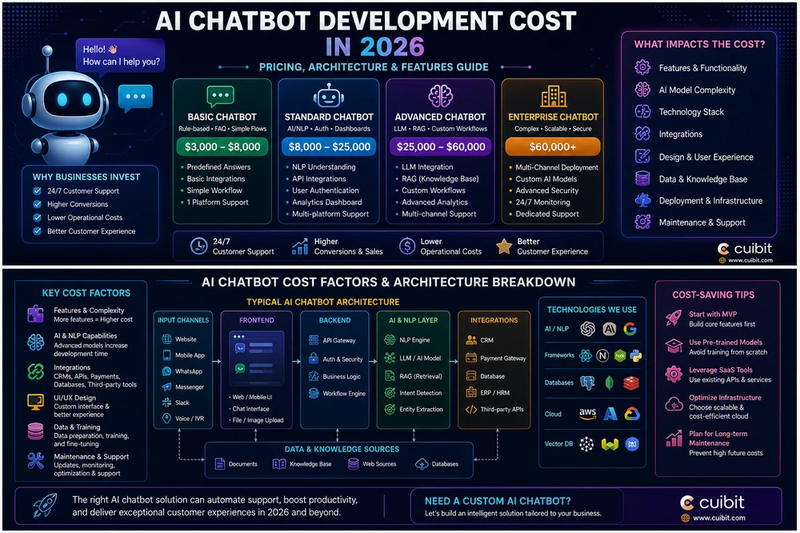
Public pricing roundups in 2026 commonly put the low end of basic chatbot work in the $5,000 to $15,000 range, with more capable RAG-based builds often landing around $15,000 to $60,000, and enterprise-grade deployments extending much higher depending on integration depth, compliance, and multi-channel scope. Those ranges are useful as orientation, not promises. A bot that answers five documented questions on a single website is not priced the same way as a system that retrieves from multiple knowledge sources and acts inside business software.
A practical budgeting model looks more like this:
Starter scope: roughly $5,000 to $15,000
Best for:
- narrow website assistants
- simple lead qualification
- limited knowledge scope
- single channel deployment
Typical characteristics:
- one frontend experience
- basic prompt and fallback design
- light analytics
- limited handoff logic
- minimal or no deep business integration
Growth scope: roughly $15,000 to $50,000
Best for:
- customer support use cases
- internal knowledge assistants
- SaaS onboarding support
- multilingual help content
Typical characteristics:
- retrieval pipeline
- document ingestion and cleanup
- multiple intents or workflows
- support or CRM integrations
- stronger analytics and feedback loops
- better guardrails and escalation paths
Advanced or enterprise scope: $50,000 to $150,000+
Best for:
- regulated or high-risk environments
- multi-team support operations
- heavy integration requirements
- multi-channel deployment
- custom admin tooling and evaluation
Typical characteristics:
- deeper orchestration
- role-aware data access
- evaluation harnesses
- advanced observability
- custom dashboards
- mobile and web coverage
- higher QA and governance overhead
If a team needs an assistant inside a broader digital product, the cost can also intersect with web development services, Next.js development, or mobile app development services depending on where the experience lives.
What actually drives AI chatbot development cost
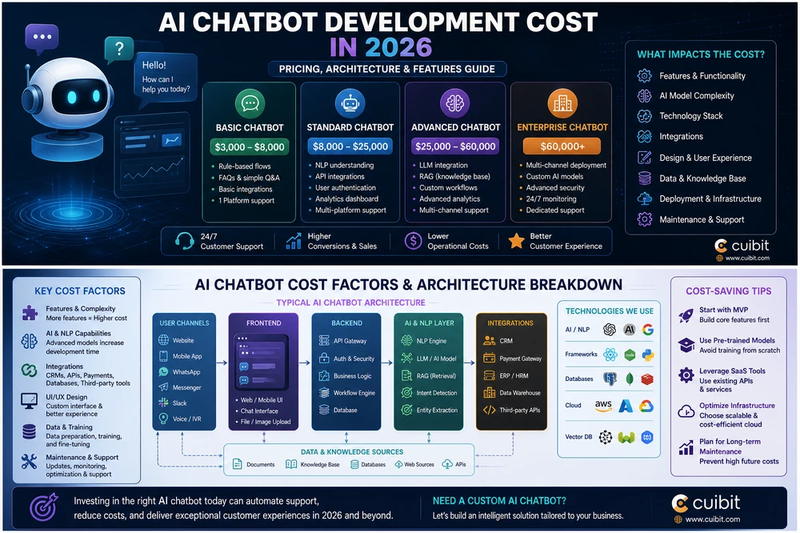
1. Data complexity
This is often the biggest hidden cost driver. A chatbot that reads clean, stable documentation is much easier to ship than one that depends on messy PDFs, product catalogs, permissioned records, or frequently changing support content.
2. Retrieval quality
RAG is not free just because you add a vector database. Good retrieval means ingestion pipelines, chunking strategy, metadata design, filtering rules, ranking logic, and evaluation. If the answer quality matters, the retrieval layer deserves real engineering time.
3. Integrations
Connecting a chatbot to your CRM, ticketing stack, ecommerce backend, ERP, help desk, or identity layer can matter more than model choice. It also increases testing and failure handling requirements.
4. Channel coverage
Web chat is one thing. Add Slack, WhatsApp, mobile apps, contact center tools, or voice, and the system design changes. In 2026, voice and service workflows are growing fast, but they also raise the bar for latency, trust, and escalation.
5. Guardrails and governance
The more business-critical the bot becomes, the more you need permissions, logging, auditability, content review, fallback rules, and human handoff. Those do not always show up in a cheap proposal, but they show up later when the system goes live.
6. UX and admin tooling
Many businesses underestimate the cost of non-model work: feedback loops, analytics dashboards, content operations, handoff views, and internal admin screens. That is where a product-minded team adds long-term value.
This is one reason businesses often combine LLM integration services with AI automation rather than treating the assistant as a standalone widget.
Why RAG changes both the price and the value
RAG increases project scope, but it usually improves the business case too.
A basic chatbot can be cheap because it only needs a small response library and a narrow conversation tree. A RAG-powered system costs more because it must retrieve trusted information, rank relevant context, manage source quality, and return answers that make sense for real business use. That extra work is usually justified when accuracy matters.
In practice, a RAG bot becomes attractive when your team needs answers grounded in:
- product documentation
- internal knowledge bases
- support articles
- policies and compliance content
- regional or language-specific resources
- private business records
That is why many serious deployments end up sitting between RAG development and LLM integration services. The model is only one piece. The system around it determines whether the output is usable.
Build vs buy vs hybrid: which pricing path makes sense?
Buy
Best for:
- simple FAQ automation
- quick launch needs
- very small teams
- limited customization requirements
The tradeoff is control. Off-the-shelf tools can be fast to launch, but they may be weak on deep integration, data structure, governance, or differentiated UX.
Build
Best for:
- productized AI experiences
- high-value support workflows
- regulated or sensitive data
- custom integrations
- teams that want ownership of the system
A custom build costs more upfront, but it usually creates more room for better retrieval, better UX, and better alignment with the way the business actually works.
Hybrid
Best for:
- teams that want to move quickly without getting trapped in a rigid platform
- phased rollouts
- experimentation before a full product build
A hybrid path often works well: start with a narrow workflow, validate it, then deepen the system with better retrieval, integrations, admin tooling, and channel expansion.
For companies that need implementation speed without losing engineering quality, it can also make sense to hire AI developers for the first production phase and keep internal ownership of roadmap decisions.
Hidden costs teams miss in chatbot proposals
This is where budgets often go wrong. The proposal covers the chatbot, but not the surrounding work.
Commonly missed costs include:
- document cleanup and content operations
- analytics and reporting
- evaluation and answer quality testing
- re-indexing and knowledge refresh workflows
- human handoff design
- integration maintenance
- language expansion
- security review
- ongoing prompt and retrieval tuning
The harder your business is to explain in a static FAQ, the more these hidden items matter.
Where AI chatbot projects usually create the clearest ROI
The best candidates are high-volume, repeatable workflows where the bot can save time without creating unnecessary risk.
Strong examples include:
- support deflection for repeat questions
- internal knowledge lookup
- onboarding and product guidance
- ecommerce assistance and order support
- lead qualification and sales routing
- multilingual knowledge delivery
- operational workflow assistance
If your team has a more complex AI roadmap, a chatbot can also be the first layer in a broader system that later expands into automation or agentic operations. Cuibit’s existing project mix already points in that direction, including work like Arabic RAG Chatbot, LLM Workbench Integration, and AI Ops Automation.
How to budget more intelligently
If you want a better estimate, scope the project around these questions:
- What is the exact workflow?
- What systems does the assistant need to read from?
- What systems does it need to write to or trigger?
- What channels must it support?
- What accuracy threshold is acceptable?
- When does it hand off to a human?
- Who owns content quality after launch?
- What reporting will stakeholders expect?
A serious chatbot budget is really a system budget. Once you look at it that way, proposal differences start to make more sense.
Practical recommendation for 2026
The strongest recommendation this year is not to buy the cheapest chatbot. It is to buy the smallest system that can solve a real, repeated problem well.
For some teams, that means a narrow website assistant and a fast launch. For others, it means a deeper rollout with retrieval, integrations, and automation. The right answer depends on where the business value sits.
If your roadmap is already moving toward AI-enabled products, customer support automation, or internal knowledge systems, start with one high-volume workflow, build the retrieval and governance layer properly, and expand from there.
Editorial conclusion
AI chatbot development cost in 2026 is best understood as a spectrum of system complexity. The headline number matters, but the architecture matters more.
If you only need lightweight coverage for a narrow website use case, a small deployment may be enough. If you want an assistant that knows your business, works across channels, and actually reduces operational pressure, the budget needs to cover retrieval, integrations, guardrails, and measurement.
That is the real divide in the market right now. Cheap chatbots are easy to buy. Useful AI systems are harder to design, but they are also the ones that create durable value.
For teams that want that second outcome, the most practical next step is usually a scoped discovery process across AI development services, AI chatbot development, RAG development, and LLM integration services so the project is priced around the workflow you actually want to improve, not a vague category label.
Need this advice turned into a real delivery plan?
We can review your current stack, pressure-test the tradeoffs in this guide and turn it into a scoped implementation plan for your team.